A practical guide to shotgun metagenomics of adult and child stool samples
This is the first data-processing step of a shotgun metagenomics workflow — trimming and filtering reads, removing host reads, then taxonomic classification — run end to end on the Omicslab platform. The example uses six stool samples from a public study, with sample data and reference databases provided.
Want to run shotgun metagenomics on your own data? Omicslab already has sample datasets to try it on, reference databases, and the infrastructure to store data and results and run the pipeline.
The results are public after registration: open them on the platform.
Not sure where to start? Here is a real run's output
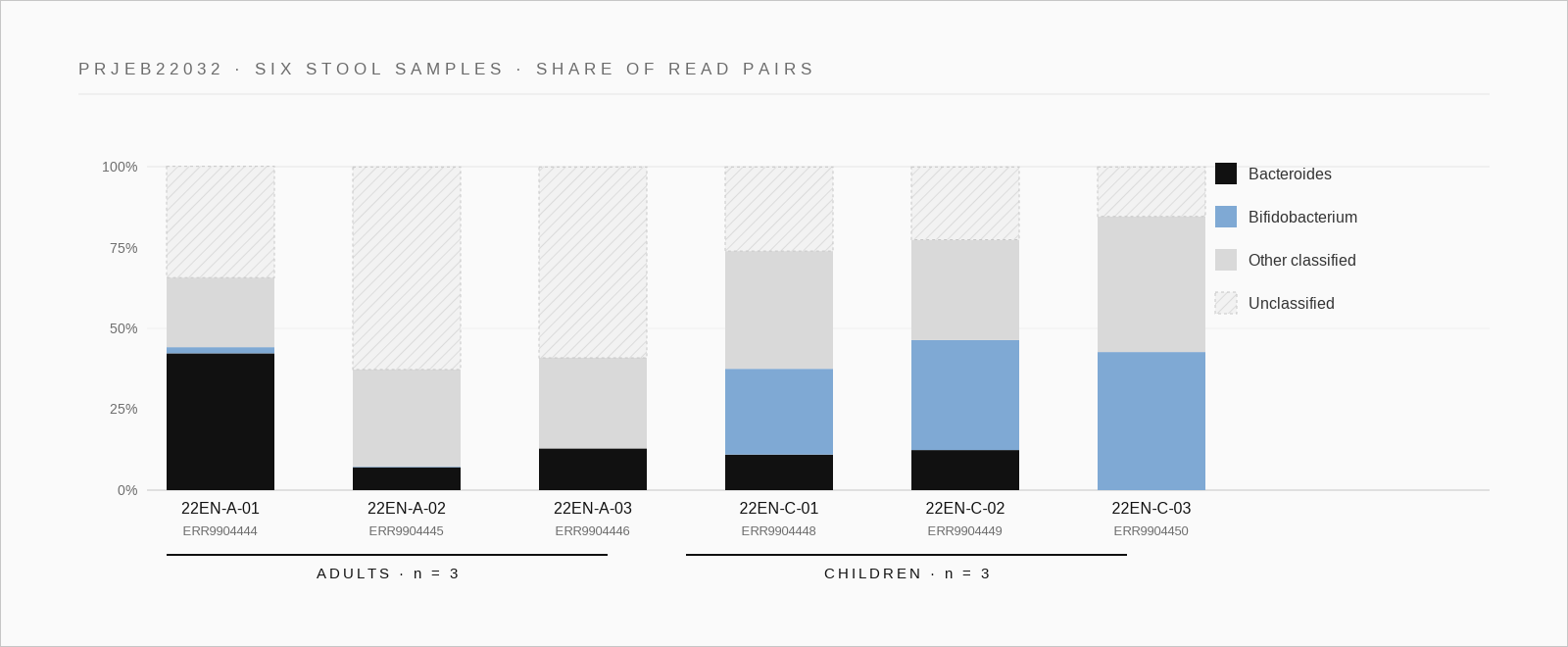
Figure 1 — Read share by major group across the six samples. Percentages are of total reads, including the unclassified fraction.
The three child samples carry Bifidobacterium at 26.5–42.7% of reads; the three adult samples have almost none (0–1.9%). Bacteroides runs the other way: 7.1–42.3% in adults, 0–12.4% in children. At species level, the child samples are led by Bifidobacterium longum, B. bifidum and B. catenulatum; the adult samples by Bacteroides thetaiotaomicron, B. fragilis and Phocaeicola vulgatus.
The direction of this difference matches the original study, where Bacteroidetes were higher in adults and young children carried more Actinobacteria. It is a check that the workflow runs correctly, not a new finding: three samples per group, group labels taken from the submitting group's sample titles (ENA carries no age field), and a single database.
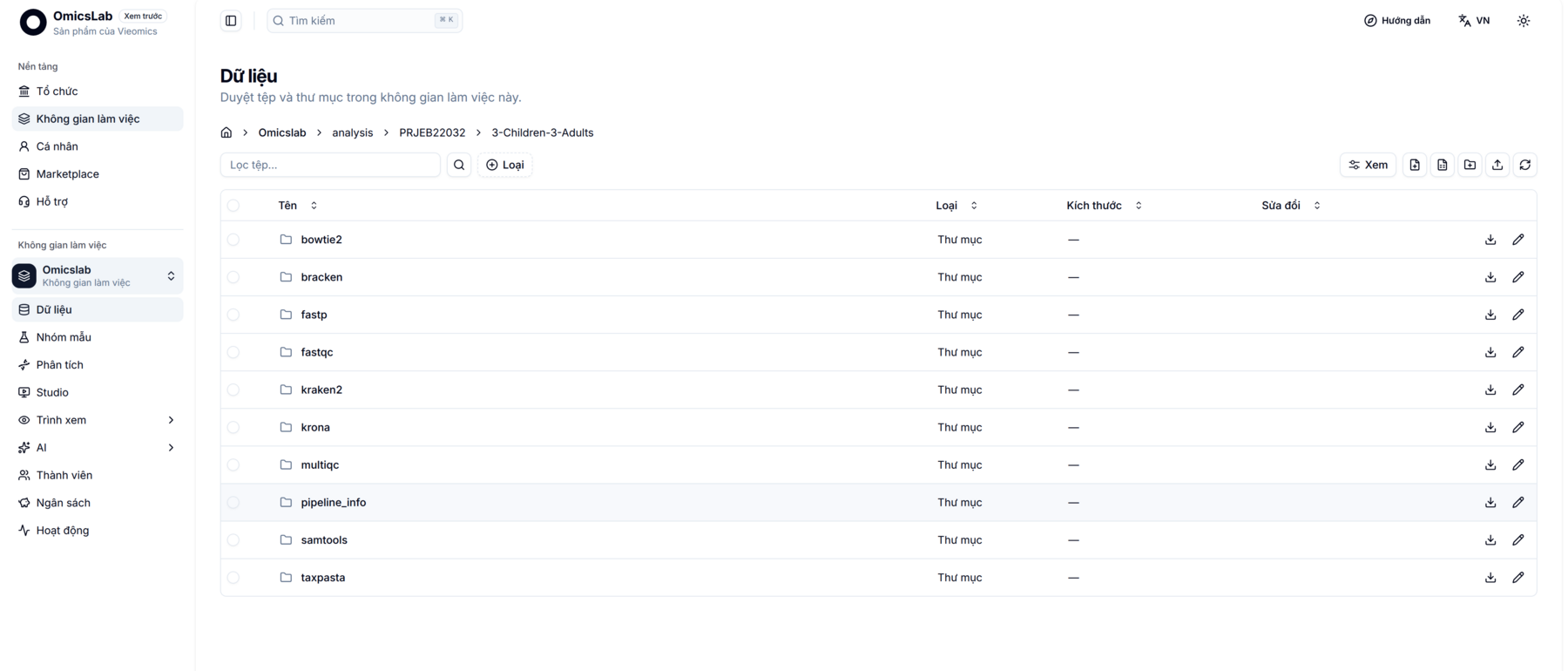
Figure 2 — The result folder inside the workspace: bowtie2, bracken, fastp, fastqc, kraken2, krona, multiqc, pipeline_info, samtools, taxpasta. Sign in and this folder opens. The screenshot shows the Vietnamese interface.
Try six real samples from the published study, just drag and drop
| Item | Result |
|---|---|
| Samples | 6 stool samples — 3 children, 3 adults |
| Input | 1.7–1.9 GB of FASTQ per sample; 73.6 million read pairs, 125 bp |
| Pipeline | nf-core/taxprofiler 2.0.1 |
| Database | Kraken2 standard 8 GB (2021 build) |
| Automated tasks | 76, run automatically once you drop the samplesheet in |
| To rerun | 1 manifest |
Table 1 — Measurements from the run, taken from pipeline_info/execution_trace and the MultiQC report.
The interesting part is not the hardware. This trial shows that the workflow can go from raw reads to taxonomic classification with one samplesheet and one manifest. For deeper data or a larger cohort, the resources are chosen to fit the data.
Run at scale: 1,200 samples or more, and stay reproducible
The run in this post is one batch of six samples. For cohorts of thousands, the platform provides LIMS/Cohort: samples are grouped into cohorts, the samplesheet is generated from the sample list, and the pipeline is triggered automatically from a saved configuration — same parameters, only the raw data changes per sample. Data can also be synced from the sequencer.
As an example: 1,200 samples become 200 batches of six, each batch using the same manifest. The 200 is arithmetic from this run, not a commitment on time — larger batches, deeper data or a 200 GB database need more resources.
The pipeline stays nf-core/taxprofiler, with no source changes. Each batch's manifest records the version, parameters and resources — enough for a reviewer to replay exactly that configuration.
Comprehensive analysis and expansion
Taxonomic profiling answers "which taxa are in this sample". It is the step that makes everything after it possible: group comparisons, resistance genes, functional analysis, strain-level work. Three things to know before using this result for a real project:
- The database is at the minimum. The 8 GB set is the smallest of Kraken2's standard builds, and the one used here was built in 2021. A full set can reach 200 GB, and gut-specific references (UHGG, GTDB) need a current version. This is why 34–63% of reads in the adult samples stayed unclassified.
- The data here is shallow. Each sample is only 1.7–1.9 GB, roughly 12 million read pairs. A real cohort is usually deeper, larger, and comes with metadata.
- Resource needs depend on the input. Three things decide them: sample count and sequencing depth, database size, and the machine configuration. Six shallow samples are not representative of a cohort.
A full cohort adds: a database chosen for the sample type, batch runs, rarefaction and diversity statistics, resistance gene and functional modules, and the delivery work for a manuscript.
We build the analysis pipeline for each group's own study — from this first classification step to a full cohort. Send the sample count, sample type and research question to contact@omicslab.io; we discuss scope and deployment before any run.
Try it on your own data
- Create an account at platform.omicslab.io — steps are in the user guide.
- Open the results of this run to browse MultiQC, Krona and the Bracken tables (registration required).
- Pick
nf-core/taxprofilerunder Analysis → Tools, point the samplesheet at your reads and run.
If nf-core and Nextflow are new to you, How to run nf-core pipelines on the Omicslab Platform covers the concepts first.
Frequently asked questions
Do I need to install anything? No — and you do not need a powerful machine either. The pipeline, containers and reference database run in the workspace; your machine only needs a browser.
Can I use a larger database? Yes. The 8 GB set is the minimum for a trial; a 200 GB set or a gut-specific reference works on the same workflow, with more storage and a longer first load.
How is a large cohort run? In batches, through LIMS/Cohort: 1,200 samples are 200 batches of six, sharing one configuration and one manifest. Resource needs depend on sample count, depth and database size, so they should be estimated on the specific data.
Can I run my own data? Yes, for data that does not contain sensitive personal data. For human or clinical data, check the service scope first; the appropriate arrangement is usually a self-hosted deployment on your own infrastructure — see Custom solutions.
One MultiQC bug. The Kraken/Bracken panel reports % Top 1 = 0.04% for ERR9904444, while that sample's Bracken table puts B. thetaiotaomicron at 35.3%. Every number in this post was therefore read from bracken/*.bracken.tsv; when reporting, keep MultiQC for the QC sections (fastp, FastQC, Bowtie2).
References
- Original study — Pereira-Dias J, Nguyen Ngoc Minh C, Tran Thi Hong C, et al. (2021). The Gut Microbiome of Healthy Vietnamese Adults and Children Is a Major Reservoir for Resistance Genes Against Critical Antimicrobials. J Infect Dis 224(Suppl 7):S840–S847. doi:10.1093/infdis/jiab398
- Data — ENA project PRJEB22032. ebi.ac.uk/ena/browser/view/PRJEB22032
- Pipeline —
nf-core/taxprofiler2.0.1. nf-co.re/taxprofiler - Kraken2 — Wood DE, Lu J, Langmead B (2019). Improved metagenomic analysis with Kraken 2. Genome Biology 20:257. doi:10.1186/s13059-019-1891-0
- Bracken — Lu J, Breitwieser FP, Thielen P, Salzberg SL (2017). Bracken: estimating species abundance in metagenomics data. PeerJ Comput Sci 3:e104. doi:10.7717/peerj-cs.104