Customizing nf-core modules: a domain-specific variant calling library

While nf-core provides a well-maintained library of Nextflow modules for bioinformatics, organizations often need domain-specific variants tailored to their analysis pipelines and computational infrastructure. The gianglabs/nf-modules repository is one example: it extends the nf-core framework by combining shared nf-core modules with custom, organization-specific modules focused on genomic data processing, particularly variant discovery and annotation. This post looks at how the gianglabs implementation differs from standard nf-core modules—in its module variants, domain-focused subworkflows, and adapted CI/CD practices.
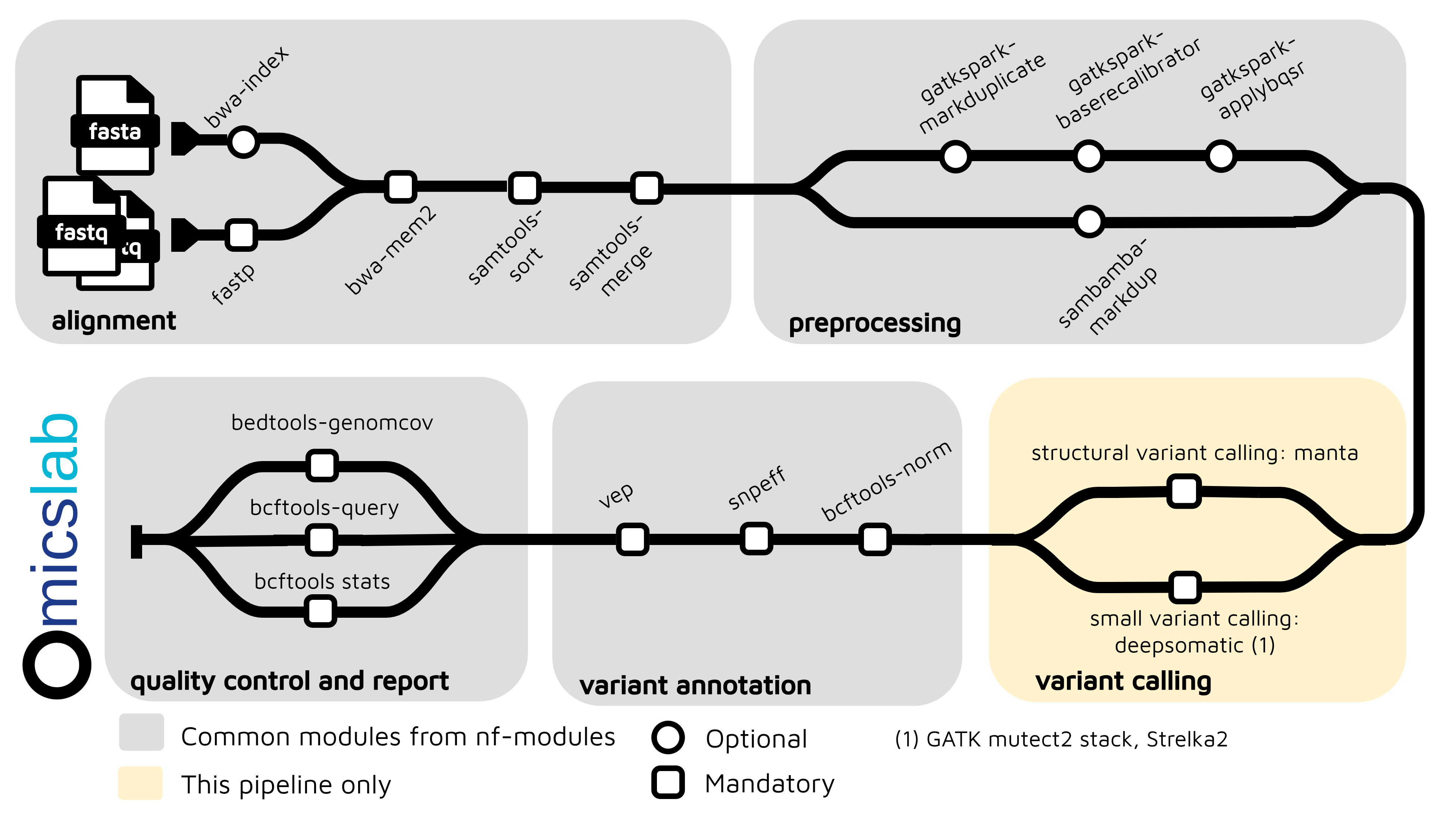
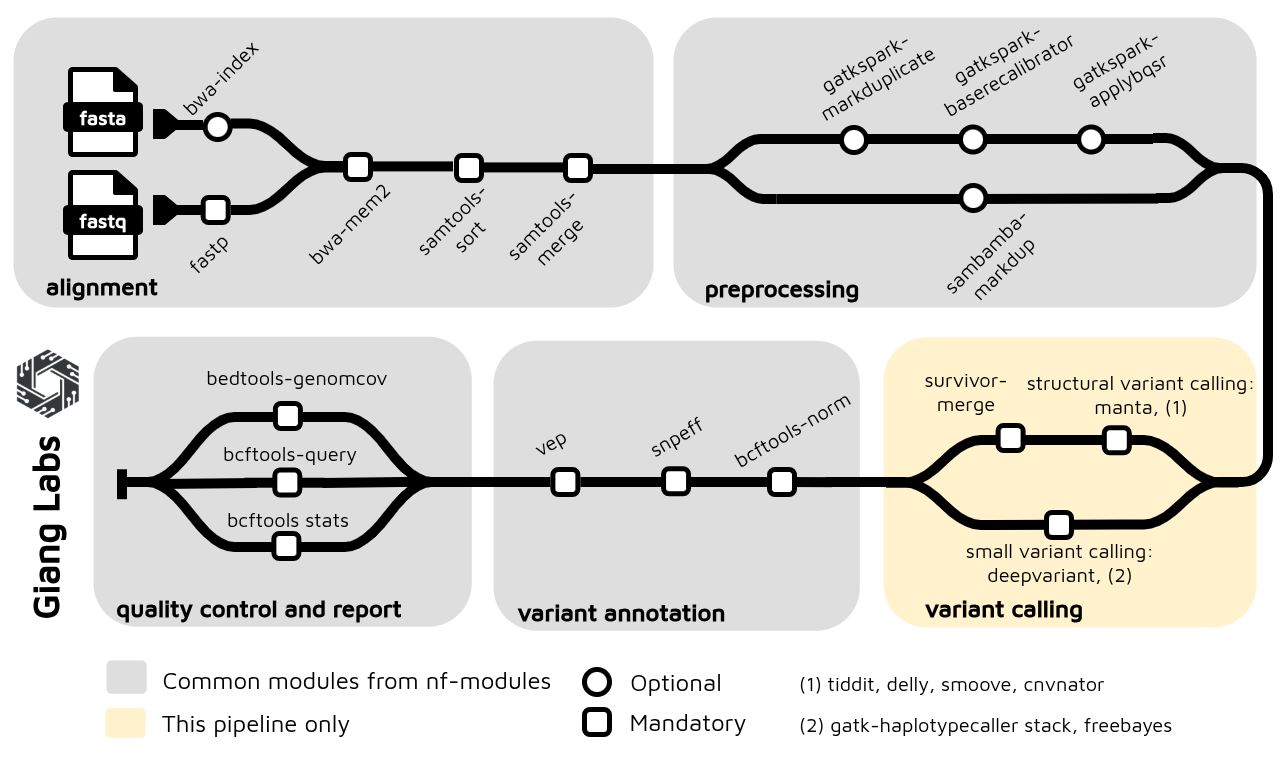
After reorganizing the modules and subworkflows, the nf-germline-short-read-variant-calling pipeline can now integrate with gianglabs/nf-modules.
1. Understanding the differences
1.1. What is nf-core/modules?
The standard nf-core/modules repository provides:
- A curated, community-maintained collection of Nextflow processes
- Modules with standardized structure, testing, and documentation
- Official nf-core-branded modules (e.g.,
bwa/mem,samtools/sort,fastqc) - Shared infrastructure available to all nf-core pipelines
- Strict quality standards and peer review
1.2. Why create an organization-specific repository?
Custom repositories like gianglabs/nf-modules extend nf-core by adding:
- Domain-specific modules not available in nf-core (e.g., specialized GATK variants)
- Tool variants adapted to local infrastructure (e.g., Spark-based GATK)
- Pre-configured subworkflows combining multiple modules into domain pipelines
- Organizational standardization across pipelines in a research group or company
- Faster iteration on modules without going through the community review process
- Cross-organization workflows mixing nf-core and custom modules
1.3. Architecture: a multi-organization module repository
gianglabs/nf-modules/│├── modules/│ ├── nf-core/ # Shared nf-core modules (dependencies)│ │ ├── fastqc/│ │ ├── samtools/│ │ ├── bwa/│ │ └── ... (installed as dependencies)│ ││ └── gianglabs/ # Custom organization-specific modules│ ├── bwamem2/ # Customized alignment (local optimization)│ ├── gatk/ # Standard GATK tools│ ├── gatkspark/ # Spark-based GATK variants (HPC optimized)│ ├── fastp/ # Customized QC/trimming│ ├── samtools/ # Custom samtools variants│ ├── bcftools/ # Variant processing│ ├── vep/ # Variant annotation│ ├── snpeff/ # Variant annotation│ └── ... (other custom modules)│├── subworkflows/│ ├── nf-core/ # Shared nf-core subworkflows│ ││ └── gianglabs/ # Domain-focused composite workflows│ ├── alignment/ # QC → Alignment → Sorting│ ├── alignment_preprocessing/ # Pre-alignment QC│ ├── variant_alignment_quality_control/ # BAM validation│ └── variant_annotation/ # VEP/snpEff annotation│└── Pixi + GitHub Actions CI/CD ├── Reusable workflows (detect-changes) └── Matrix-based testing (modules × subworkflows)2. Core differences: a pragmatic testing strategy
2.1. The nf-core approach: comprehensive but resource-heavy
The standard nf-core/modules testing philosophy emphasizes broad compatibility:
# nf-core approach (complex)testing: - conda environment # Full dependency management - docker container # Platform-agnostic testing - singularity image # HPC cluster compatibility - GPU variant tests # Accelerated compute scenarios - Multiple shards # Distributed test executionRequirements:
- Several runtime environments configured in CI/CD
- Docker images plus Singularity conversions
- GPU runners for GPU tests
- Higher CI/CD cost and complexity
- Longer feedback loops
Problem: if the target HPC environment does not use GPUs, maintaining conda + docker + singularity testing adds complexity without benefit for that specific use case.
2.2. The gianglabs approach: environment-aware
The customized gianglabs/nf-modules testing strategy is more environment-aware and cost-conscious:
# gianglabs approach (focused)Testing Strategy: GitHub Actions CI/CD: - docker container only # Fast, resource-efficient validation - CPU tests only # Matches actual HPC production - Quick feedback (<5 min) # Faster iteration
Local HPC Development: - singularity/apptainer # Native HPC runtime - Manual testing before push # Comprehensive validation - Real-world execution profile # True performance testingGuiding ideas:
- Docker for CI/CD validation: quickly catch obvious issues (syntax, imports, basic logic)
- Singularity for real testing: run on the actual HPC environment with real data patterns
- Single source of truth: one Docker container that converts to Singularity
- No redundant multi-environment testing: if the Docker→Singularity conversion fails, it is a container issue, not a test design issue
2.3. Practical benefits
Before (nf-core style):
Pull Request ├─ Test conda env (10 min) → May pass but conda not used in production ├─ Test docker (10 min) → May pass but HPC uses singularity ├─ Test singularity (15 min) → HPC-relevant but slow ├─ Test GPU (20 min) → Unnecessary for CPU-only HPC └─ Total CI time: ~45 min (wasted on irrelevant scenarios)After (gianglabs pragmatic):
Pull Request ├─ Test docker (10 min) → Validates code quickly └─ Total CI time: ~10 min (focused feedback)
Developer (Local HPC): ├─ Manual singularity test → Comprehensive validation ├─ Test with actual data → Real-world performance ├─ Push when confident └─ CI catches edge cases in 10 minWhat this saves:
- Lower GitHub Actions costs
- Focus on the actual execution environment (Singularity on HPC)
- Docker→Singularity conversion is treated as a container concern, not a test design concern
2.4. Module container specification
To keep Docker and Singularity environments consistent, the gianglabs approach uses a single Docker image as the source of truth. Nextflow converts this image to Singularity at runtime, which avoids maintaining dual container definitions.
Simple container specification:
// Module specifies ONLY Docker - Nextflow handles Singularity conversionprocess EXAMPLEMODULE { container "quay.io/biocontainers/bwamem2:2.0--h1296002_0"
script: """ bwa-mem2 mem ... """}This contrasts with nf-core's fastp module, which maintains conditional logic for multiple container engines:
process FASTP { tag "$meta.id" label 'process_medium'
conda "${moduleDir}/environment.yml" container "${ workflow.containerEngine == 'singularity' && !task.ext.singularity_pull_docker_container ? 'https://community-cr-prod.seqera.io/docker/registry/v2/blobs/sha256/55/556474e164daf5a5e218cd5d497681dcba0645047cf24698f88e3e078eacbd09/data' : 'community.wave.seqera.io/library/fastp:1.1.0--08aa7c5662a30d57' }"
input: tuple val(meta), path(reads), path(adapter_fasta) val discard_trimmed_pass val save_trimmed_fail val save_merged
output: tuple val(meta), path('*.fastp.fastq.gz') , optional:true, emit: reads tuple val(meta), path('*.json') , emit: json tuple val(meta), path('*.html') , emit: html tuple val(meta), path('*.log') , emit: log tuple val(meta), path('*.fail.fastq.gz') , optional:true, emit: reads_fail tuple val(meta), path('*.merged.fastq.gz'), optional:true, emit: reads_merged tuple val("${task.process}"), val('fastp'), eval('fastp --version 2>&1 | sed -e "s/fastp //g"'), emit: versions_fastp, topic: versions
when: task.ext.when == null || task.ext.when
script: def args = task.ext.args ?: '' def prefix = task.ext.prefix ?: "${meta.id}" def adapter_list = adapter_fasta ? "--adapter_fasta ${adapter_fasta}" : "" def fail_fastq = save_trimmed_fail && meta.single_end ? "--failed_out ${prefix}.fail.fastq.gz" : save_trimmed_fail && !meta.single_end ? "--failed_out ${prefix}.paired.fail.fastq.gz --unpaired1 ${prefix}_R1.fail.fastq.gz --unpaired2 ${prefix}_R2.fail.fastq.gz" : '' def out_fq1 = discard_trimmed_pass ?: ( meta.single_end ? "--out1 ${prefix}.fastp.fastq.gz" : "--out1 ${prefix}_R1.fastp.fastq.gz" ) def out_fq2 = discard_trimmed_pass ?: "--out2 ${prefix}_R2.fastp.fastq.gz" // Added soft-links to original fastqs for consistent naming in MultiQC // Use single ended for interleaved. Add --interleaved_in in config. if ( task.ext.args?.contains('--interleaved_in') ) { """ [ ! -f ${prefix}.fastq.gz ] && ln -sf $reads ${prefix}.fastq.gz
fastp \\ --stdout \\ --in1 ${prefix}.fastq.gz \\ --thread $task.cpus \\ --json ${prefix}.fastp.json \\ --html ${prefix}.fastp.html \\ $adapter_list \\ $fail_fastq \\ $args \\ 2>| >(tee ${prefix}.fastp.log >&2) \\ | gzip -c > ${prefix}.fastp.fastq.gz """ } else if (meta.single_end) { """ [ ! -f ${prefix}.fastq.gz ] && ln -sf $reads ${prefix}.fastq.gz
fastp \\ --in1 ${prefix}.fastq.gz \\ $out_fq1 \\ --thread $task.cpus \\ --json ${prefix}.fastp.json \\ --html ${prefix}.fastp.html \\ $adapter_list \\ $fail_fastq \\ $args \\ 2>| >(tee ${prefix}.fastp.log >&2) """ } else { def merge_fastq = save_merged ? "-m --merged_out ${prefix}.merged.fastq.gz" : '' """ [ ! -f ${prefix}_R1.fastq.gz ] && ln -sf ${reads[0]} ${prefix}_R1.fastq.gz [ ! -f ${prefix}_R2.fastq.gz ] && ln -sf ${reads[1]} ${prefix}_R2.fastq.gz fastp \\ --in1 ${prefix}_R1.fastq.gz \\ --in2 ${prefix}_R2.fastq.gz \\ $out_fq1 \\ $out_fq2 \\ --json ${prefix}.fastp.json \\ --html ${prefix}.fastp.html \\ $adapter_list \\ $fail_fastq \\ $merge_fastq \\ --thread $task.cpus \\ --detect_adapter_for_pe \\ $args \\ 2>| >(tee ${prefix}.fastp.log >&2) """ }
stub: def prefix = task.ext.prefix ?: "${meta.id}" def is_single_output = task.ext.args?.contains('--interleaved_in') || meta.single_end def touch_reads = (discard_trimmed_pass) ? "" : (is_single_output) ? "echo '' | gzip > ${prefix}.fastp.fastq.gz" : "echo '' | gzip > ${prefix}_R1.fastp.fastq.gz ; echo '' | gzip > ${prefix}_R2.fastp.fastq.gz" def touch_merged = (!is_single_output && save_merged) ? "echo '' | gzip > ${prefix}.merged.fastq.gz" : "" def touch_fail_fastq = (!save_trimmed_fail) ? "" : meta.single_end ? "echo '' | gzip > ${prefix}.fail.fastq.gz" : "echo '' | gzip > ${prefix}.paired.fail.fastq.gz ; echo '' | gzip > ${prefix}_R1.fail.fastq.gz ; echo '' | gzip > ${prefix}_R2.fail.fastq.gz" """ $touch_reads $touch_fail_fastq $touch_merged touch "${prefix}.fastp.json" touch "${prefix}.fastp.html" touch "${prefix}.fastp.log" """}gianglabs simplification: domain-focused modules prioritize clarity and maintainability. Where nf-core's fastp supports single-end, paired-end, and interleaved modes, the gianglabs FASTP_TRIM module handles only paired-end reads—the production use case:
process FASTP_TRIM { tag "${meta.id}" label 'process_medium' container 'quay.io/biocontainers/fastp:1.1.0--heae3180_0'
input: tuple val(meta), path(reads)
output: tuple val(meta), path("*_trimmed_{1,2}.fastq.gz"), emit: reads tuple val(meta), path("*.html"), emit: html tuple val(meta), path("*.json"), emit: json path "versions.yml", emit: versions
when: task.ext.when == null || task.ext.when
script: def args = task.ext.args ?: '' def prefix = task.ext.prefix ?: "${meta.read_group}"
""" # Adapter trimming, quality filtering, and QC with fastp fastp \\ --thread ${task.cpus} \\ --in1 ${reads[0]} \\ --in2 ${reads[1]} \\ --out1 ${prefix}_trimmed_1.fastq.gz \\ --out2 ${prefix}_trimmed_2.fastq.gz \\ --html ${prefix}_fastp.html \\ --json ${prefix}_fastp.json \\ --qualified_quality_phred 20 \\ --length_required 50 \\ --detect_adapter_for_pe \\ ${args}
# Create versions file cat <<-END_VERSIONS > versions.yml "${task.process}": fastp: \$(fastp --version 2>&1 | grep -oP 'fastp \\K[0-9.]+') END_VERSIONS """}3. CI/CD and core implementation details
3.1. Multi-language linting via Makefile and Pixi
Challenge: bioinformatics modules often combine code from several programming languages:
- Nextflow/Groovy: workflow orchestration
- Python: data processing, utility scripts
- R: statistical analysis, visualization
gianglabs solution: a unified linting workflow via Makefile + Pixi environment.
Pixi configuration for multi-language support
# pixi.toml - Reproducible environment with language tools[dependencies]python = "3.11.*"nf-test = ">=0.9.5,<0.10"nextflow = ">=25.10.4,<26"ruff = ">=0.1.0" # Python linter + formatterr = ">=4.0" # R interpreterr-lintr = ">=3.0.0" # R linter
[pypi-dependencies]nf-core = ">=3.5.2, <4"pre-commit = ">=3.0.0"Benefits:
- All language runtimes in one reproducible environment
- No system dependencies scattered across machines
pixi shellactivates the complete dev environment
Makefile: convenient linting commands
# Makefile - Centralized development commands
.PHONY: lint lint-python lint-r lint-nf test clean
# Run all linterslint: lint-python lint-r pre-commit
# Python linting (Ruff)lint-python: @echo "Linting Python files with Ruff..." ruff check modules/ subworkflows/ --fix ruff format modules/ subworkflows/
# R linting (lintr)lint-r: @echo "Linting R files with lintr..." Rscript -e "lintr::lint_dir('modules/', recurse = TRUE)" Rscript -e "lintr::lint_dir('subworkflows/', recurse = TRUE)"
# Pre-commit hookspre-commit: @echo "Running pre-commit checks..." pre-commit run --all-files
# Run teststest: @echo "Running nf-test..." nf-test test --profile docker
# Clean artifactsclean: rm -rf .nf-test work/Developer workflow
# Activate Pixi environment (installs Python, R, Nextflow, lintr, ruff)pixi shell
# Run all linters in one commandmake lint
# Or run specific language lintersmake lint-python # Check Python codemake lint-r # Check R codemake pre-commit # YAML, Nextflow syntax, JSON schemas
# Run testsmake test
# Clean artifactsmake cleanLanguage-specific tools
Python (Ruff):
# Check imports, undefined variables, and style violationsruff check modules/gianglabs/ --select I,E1,E4,E7,E9,F,UP,N
# Auto-format coderuff format modules/gianglabs/R (lintr):
# Check naming conventions, style, and unused variablesRscript -e "lintr::lint_dir('modules/gianglabs/', recurse = TRUE)"Nextflow/Groovy (pre-commit hooks):
- repo: https://github.com/pre-commit/mirrors-prettier hooks: - id: prettier files: \.(nf|groovy)$3.2. Reusable workflow pattern: detect-changes.yml
To keep CI/CD efficient, gianglabs uses a reusable GitHub Actions workflow that detects which modules or subworkflows changed in a pull request, then triggers tests only for the affected components. This avoids unnecessary test runs while keeping validation comprehensive:
name: Detect changed components
on: workflow_call: outputs: modules: description: "Space-separated list of changed modules" value: ${{ jobs.detect-changes.outputs.modules }} subworkflows: description: "Space-separated list of changed subworkflows" value: ${{ jobs.detect-changes.outputs.subworkflows }}
jobs: detect-changes: runs-on: ubuntu-latest outputs: modules: ${{ steps.changed-modules.outputs.all_changed_files }} subworkflows: ${{ steps.changed-subworkflows.outputs.all_changed_files }} steps: - name: Get changed modules uses: tj-actions/changed-files@v46.0.5 with: dir_names: "true" dir_names_max_depth: 4 files: modules/gianglabs/** base_sha: ${{ github.event.pull_request.base.ref || 'origin/main' }}
- name: Get changed subworkflows uses: tj-actions/changed-files@v46.0.5 with: dir_names: "true" dir_names_max_depth: 3 files: subworkflows/gianglabs/** base_sha: ${{ github.event.pull_request.base.ref || 'origin/main' }}3.3. Matrix-based testing
The detect-changes.yml workflow outputs a list of changed modules, which is then transformed into a GitHub Actions matrix for parallel testing. Each module runs independently:
Dynamic matrix generation from changed modules:
prepare-modules: name: Prepare module matrix needs: detect-changes if: needs.detect-changes.outputs.modules != '' runs-on: ubuntu-latest outputs: matrix: ${{ steps.set-matrix.outputs.matrix }} steps: - name: Set matrix id: set-matrix run: | MODULES="${{ needs.detect-changes.outputs.modules }}" # Convert space-separated string to JSON array MATRIX=$(echo $MODULES | jq -cR 'split(" ") | map(select(length > 0))') echo "matrix=$MATRIX" >> $GITHUB_OUTPUT
# Use the matrix for parallel jobsnf-test-modules: needs: [detect-changes, prepare-modules] strategy: matrix: module: ${{ fromJson(needs.prepare-modules.outputs.matrix) }} steps: - name: Run nf-test with Docker run: nf-test test modules/gianglabs/${{ matrix.module }}/ --profile docker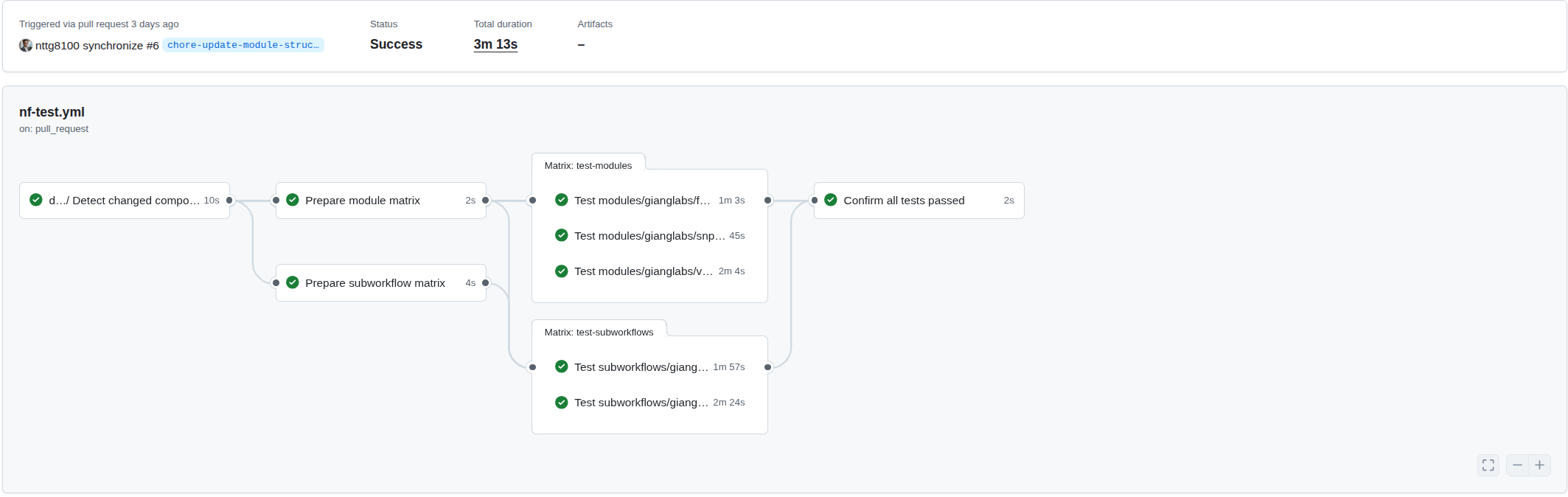
3.4. Practical application: reorganizing an existing pipeline
This approach is useful when migrating modules from an existing pipeline. As an example, the nf-germline-short-read-variant-calling pipeline was reorganized to extract reusable modules and subworkflows into gianglabs/nf-modules. Other pipelines can then install these components directly:
# Install a specific module from gianglabs/nf-modulesnf-core modules --git-remote https://github.com/gianglabs/nf-modules.git install bcftools/index
# Install a reusable subworkflownf-core subworkflows --git-remote https://github.com/gianglabs/nf-modules.git install alignmentRepository structure after reorganization:
# Reorganized modules directory (v1.0.0)modules/├── gianglabs/ # Optimized for production use│ ├── bcftools│ ├── bedtools│ ├── bwamem2│ ├── fastp│ ├── gatk│ ├── gatkspark│ ├── sambamba│ ├── samtools│ ├── snpeff│ └── vep└── local/ # Pipeline-specific modules ├── cnvnator ├── deepvariant ├── delly ├── freebayes ├── gatk ├── manta ├── smoove ├── survivor └── tiddit
# Reusable subworkflowssubworkflows/├── gianglabs/ # Domain-specific composition│ ├── alignment│ ├── alignment_preprocessing│ ├── variant_alignment_quality_control│ └── variant_annotation└── local/ # Pipeline-specific logic └── variant_callingThis separation enables code reuse across pipelines while keeping pipeline-specific customizations in the local namespace.
References
- nf-core/modules — official shared module repository
- gianglabs/nf-modules — example custom modules
- nf-core/tools — module management CLI tool
- nf-test Documentation — testing framework
- Pixi Documentation — reproducible environment management
- GATK Documentation — Genome Analysis Toolkit
- GitHub Actions Reusable Workflows — workflow composition
- Cover image: Programmer at work (Unsplash) — Crew crew, Wikimedia Commons, CC0