

Tùy biến module nf-core: thư viện gọi biến thể đặc thù cho lĩnh vực

nf-core cung cấp một thư viện module Nextflow được duy trì tốt cho bioinformatics, nhưng các tổ chức thường cần những biến thể đặc thù cho lĩnh vực, phù hợp với pipeline phân tích và hạ tầng tính toán của mình. Repository gianglabs/nf-modules là một ví dụ: nó mở rộng khung nf-core bằng cách kết hợp các module nf-core dùng chung với những module tùy biến đặc thù tổ chức, tập trung vào xử lý dữ liệu hệ gen, đặc biệt là phát hiện và chú giải biến thể. Bài viết này xem xét cách bản triển khai gianglabs khác với module nf-core tiêu chuẩn — ở các biến thể module, subworkflow tập trung theo lĩnh vực và cách thích ứng trong CI/CD.
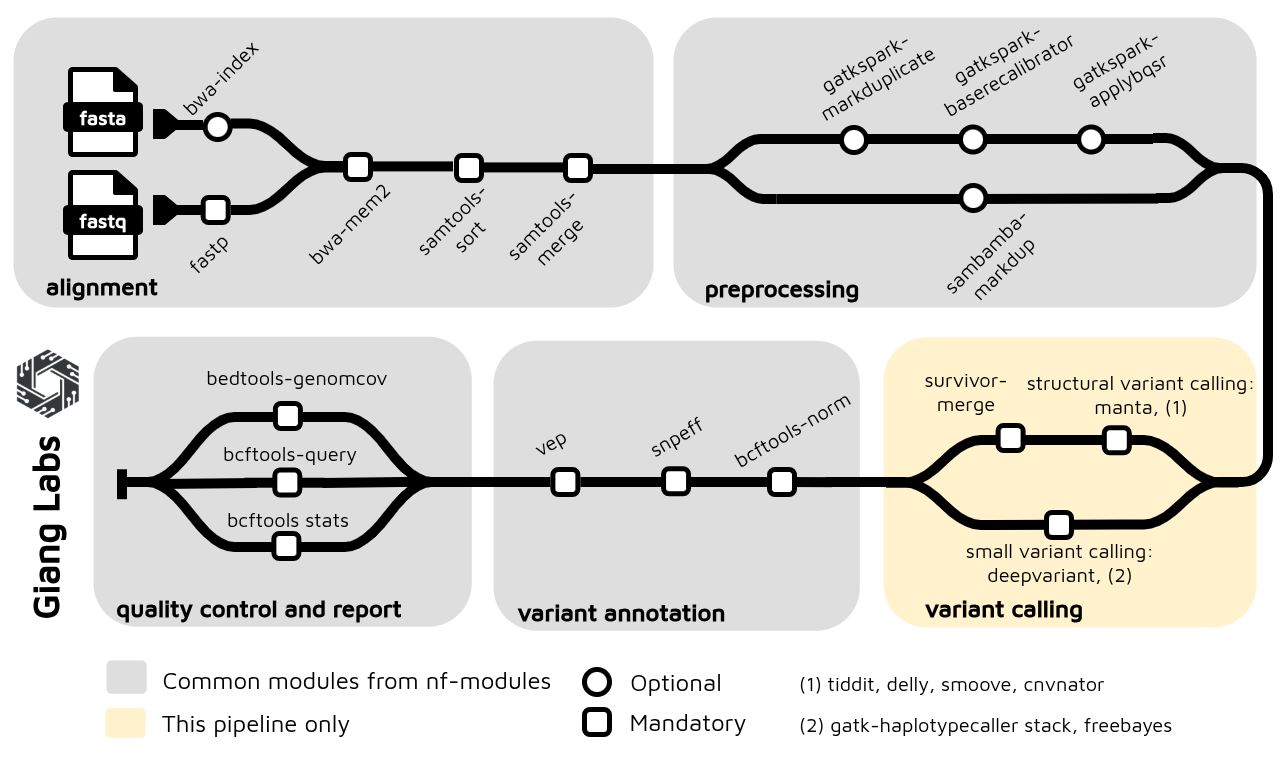
Sau khi tổ chức lại module và subworkflow, pipeline nf-germline-short-read-variant-calling hiện có thể tích hợp với gianglabs/nf-modules.
1. Hiểu về những khác biệt
1.1. nf-core/modules là gì?
Repository nf-core/modules tiêu chuẩn cung cấp:
- Một bộ sưu tập process Nextflow được chọn lọc và duy trì bởi cộng đồng
- Module có cấu trúc, kiểm thử và tài liệu chuẩn hóa
- Các module chính thức mang thương hiệu nf-core (ví dụ
bwa/mem,samtools/sort,fastqc) - Hạ tầng dùng chung cho mọi pipeline nf-core
- Tiêu chuẩn chất lượng nghiêm ngặt và peer review
1.2. Vì sao tạo repository riêng cho tổ chức?
Các repository tùy biến như gianglabs/nf-modules mở rộng nf-core bằng cách thêm:
- Module đặc thù lĩnh vực không có trong nf-core (ví dụ các biến thể GATK chuyên biệt)
- Biến thể công cụ phù hợp hạ tầng cục bộ (ví dụ GATK dựa trên Spark)
- Subworkflow cấu hình sẵn kết hợp nhiều module thành pipeline theo lĩnh vực
- Chuẩn hóa trong tổ chức giữa các pipeline trong một nhóm nghiên cứu hoặc công ty
- Lặp nhanh hơn trên module mà không qua quy trình review cộng đồng
- Workflow liên tổ chức kết hợp module nf-core và module tùy biến
1.3. Kiến trúc: repository module đa tổ chức
gianglabs/nf-modules/│├── modules/│ ├── nf-core/ # Shared nf-core modules (dependencies)│ │ ├── fastqc/│ │ ├── samtools/│ │ ├── bwa/│ │ └── ... (installed as dependencies)│ ││ └── gianglabs/ # Custom organization-specific modules│ ├── bwamem2/ # Customized alignment (local optimization)│ ├── gatk/ # Standard GATK tools│ ├── gatkspark/ # Spark-based GATK variants (HPC optimized)│ ├── fastp/ # Customized QC/trimming│ ├── samtools/ # Custom samtools variants│ ├── bcftools/ # Variant processing│ ├── vep/ # Variant annotation│ ├── snpeff/ # Variant annotation│ └── ... (other custom modules)│├── subworkflows/│ ├── nf-core/ # Shared nf-core subworkflows│ ││ └── gianglabs/ # Domain-focused composite workflows│ ├── alignment/ # QC → Alignment → Sorting│ ├── alignment_preprocessing/ # Pre-alignment QC│ ├── variant_alignment_quality_control/ # BAM validation│ └── variant_annotation/ # VEP/snpEff annotation│└── Pixi + GitHub Actions CI/CD ├── Reusable workflows (detect-changes) └── Matrix-based testing (modules × subworkflows)2. Khác biệt cốt lõi: chiến lược kiểm thử thực dụng
2.1. Cách tiếp cận nf-core: toàn diện nhưng tốn tài nguyên
Triết lý kiểm thử của nf-core/modules tiêu chuẩn nhấn mạnh khả năng tương thích rộng:
# nf-core approach (complex)testing: - conda environment # Full dependency management - docker container # Platform-agnostic testing - singularity image # HPC cluster compatibility - GPU variant tests # Accelerated compute scenarios - Multiple shards # Distributed test executionYêu cầu:
- Nhiều môi trường runtime được cấu hình trong CI/CD
- Docker image cùng chuyển đổi sang Singularity
- Runner GPU cho các bài kiểm thử GPU
- Chi phí và độ phức tạp CI/CD cao hơn
- Vòng phản hồi dài hơn
Vấn đề: nếu môi trường HPC đích không dùng GPU, việc duy trì kiểm thử conda + docker + singularity làm tăng độ phức tạp mà không đem lại lợi ích cho trường hợp sử dụng cụ thể đó.
2.2. Cách tiếp cận gianglabs: gắn với môi trường thực tế
Chiến lược kiểm thử của gianglabs/nf-modules chú ý hơn đến môi trường và chi phí:
# gianglabs approach (focused)Testing Strategy: GitHub Actions CI/CD: - docker container only # Fast, resource-efficient validation - CPU tests only # Matches actual HPC production - Quick feedback (<5 min) # Faster iteration
Local HPC Development: - singularity/apptainer # Native HPC runtime - Manual testing before push # Comprehensive validation - Real-world execution profile # True performance testingÝ tưởng chủ đạo:
- Docker cho xác thực CI/CD: nhanh chóng bắt các lỗi rõ ràng (cú pháp, import, logic cơ bản)
- Singularity cho kiểm thử thật: chạy trên môi trường HPC thực tế với mẫu dữ liệu thật
- Một nguồn chân lý duy nhất: một container Docker chuyển đổi sang Singularity
- Không kiểm thử dư thừa nhiều môi trường: nếu chuyển đổi Docker→Singularity thất bại, đó là vấn đề container, không phải vấn đề thiết kế kiểm thử
2.3. Lợi ích thực tế
Trước (kiểu nf-core):
Pull Request ├─ Test conda env (10 min) → May pass but conda not used in production ├─ Test docker (10 min) → May pass but HPC uses singularity ├─ Test singularity (15 min) → HPC-relevant but slow ├─ Test GPU (20 min) → Unnecessary for CPU-only HPC └─ Total CI time: ~45 min (wasted on irrelevant scenarios)Sau (gianglabs thực dụng):
Pull Request ├─ Test docker (10 min) → Validates code quickly └─ Total CI time: ~10 min (focused feedback)
Developer (Local HPC): ├─ Manual singularity test → Comprehensive validation ├─ Test with actual data → Real-world performance ├─ Push when confident └─ CI catches edge cases in 10 minTiết kiệm được:
- Giảm chi phí GitHub Actions
- Tập trung vào môi trường thực thi thật (Singularity trên HPC)
- Chuyển đổi Docker→Singularity được xem là vấn đề container, không phải vấn đề thiết kế kiểm thử
2.4. Đặc tả container của module
Để giữ Docker và Singularity nhất quán, cách làm gianglabs dùng một Docker image làm nguồn chân lý duy nhất. Nextflow chuyển image này sang Singularity lúc chạy, tránh phải duy trì hai định nghĩa container.
Đặc tả container đơn giản:
// Module specifies ONLY Docker - Nextflow handles Singularity conversionprocess EXAMPLEMODULE { container "quay.io/biocontainers/bwamem2:2.0--h1296002_0"
script: """ bwa-mem2 mem ... """}Cách này tương phản với module fastp của nf-core, vốn duy trì logic điều kiện cho nhiều container engine:
process FASTP { tag "$meta.id" label 'process_medium'
conda "${moduleDir}/environment.yml" container "${ workflow.containerEngine == 'singularity' && !task.ext.singularity_pull_docker_container ? 'https://community-cr-prod.seqera.io/docker/registry/v2/blobs/sha256/55/556474e164daf5a5e218cd5d497681dcba0645047cf24698f88e3e078eacbd09/data' : 'community.wave.seqera.io/library/fastp:1.1.0--08aa7c5662a30d57' }"
input: tuple val(meta), path(reads), path(adapter_fasta) val discard_trimmed_pass val save_trimmed_fail val save_merged
output: tuple val(meta), path('*.fastp.fastq.gz') , optional:true, emit: reads tuple val(meta), path('*.json') , emit: json tuple val(meta), path('*.html') , emit: html tuple val(meta), path('*.log') , emit: log tuple val(meta), path('*.fail.fastq.gz') , optional:true, emit: reads_fail tuple val(meta), path('*.merged.fastq.gz'), optional:true, emit: reads_merged tuple val("${task.process}"), val('fastp'), eval('fastp --version 2>&1 | sed -e "s/fastp //g"'), emit: versions_fastp, topic: versions
when: task.ext.when == null || task.ext.when
script: def args = task.ext.args ?: '' def prefix = task.ext.prefix ?: "${meta.id}" def adapter_list = adapter_fasta ? "--adapter_fasta ${adapter_fasta}" : "" def fail_fastq = save_trimmed_fail && meta.single_end ? "--failed_out ${prefix}.fail.fastq.gz" : save_trimmed_fail && !meta.single_end ? "--failed_out ${prefix}.paired.fail.fastq.gz --unpaired1 ${prefix}_R1.fail.fastq.gz --unpaired2 ${prefix}_R2.fail.fastq.gz" : '' def out_fq1 = discard_trimmed_pass ?: ( meta.single_end ? "--out1 ${prefix}.fastp.fastq.gz" : "--out1 ${prefix}_R1.fastp.fastq.gz" ) def out_fq2 = discard_trimmed_pass ?: "--out2 ${prefix}_R2.fastp.fastq.gz" // Added soft-links to original fastqs for consistent naming in MultiQC // Use single ended for interleaved. Add --interleaved_in in config. if ( task.ext.args?.contains('--interleaved_in') ) { """ [ ! -f ${prefix}.fastq.gz ] && ln -sf $reads ${prefix}.fastq.gz
fastp \\ --stdout \\ --in1 ${prefix}.fastq.gz \\ --thread $task.cpus \\ --json ${prefix}.fastp.json \\ --html ${prefix}.fastp.html \\ $adapter_list \\ $fail_fastq \\ $args \\ 2>| >(tee ${prefix}.fastp.log >&2) \\ | gzip -c > ${prefix}.fastp.fastq.gz """ } else if (meta.single_end) { """ [ ! -f ${prefix}.fastq.gz ] && ln -sf $reads ${prefix}.fastq.gz
fastp \\ --in1 ${prefix}.fastq.gz \\ $out_fq1 \\ --thread $task.cpus \\ --json ${prefix}.fastp.json \\ --html ${prefix}.fastp.html \\ $adapter_list \\ $fail_fastq \\ $args \\ 2>| >(tee ${prefix}.fastp.log >&2) """ } else { def merge_fastq = save_merged ? "-m --merged_out ${prefix}.merged.fastq.gz" : '' """ [ ! -f ${prefix}_R1.fastq.gz ] && ln -sf ${reads[0]} ${prefix}_R1.fastq.gz [ ! -f ${prefix}_R2.fastq.gz ] && ln -sf ${reads[1]} ${prefix}_R2.fastq.gz fastp \\ --in1 ${prefix}_R1.fastq.gz \\ --in2 ${prefix}_R2.fastq.gz \\ $out_fq1 \\ $out_fq2 \\ --json ${prefix}.fastp.json \\ --html ${prefix}.fastp.html \\ $adapter_list \\ $fail_fastq \\ $merge_fastq \\ --thread $task.cpus \\ --detect_adapter_for_pe \\ $args \\ 2>| >(tee ${prefix}.fastp.log >&2) """ }
stub: def prefix = task.ext.prefix ?: "${meta.id}" def is_single_output = task.ext.args?.contains('--interleaved_in') || meta.single_end def touch_reads = (discard_trimmed_pass) ? "" : (is_single_output) ? "echo '' | gzip > ${prefix}.fastp.fastq.gz" : "echo '' | gzip > ${prefix}_R1.fastp.fastq.gz ; echo '' | gzip > ${prefix}_R2.fastp.fastq.gz" def touch_merged = (!is_single_output && save_merged) ? "echo '' | gzip > ${prefix}.merged.fastq.gz" : "" def touch_fail_fastq = (!save_trimmed_fail) ? "" : meta.single_end ? "echo '' | gzip > ${prefix}.fail.fastq.gz" : "echo '' | gzip > ${prefix}.paired.fail.fastq.gz ; echo '' | gzip > ${prefix}_R1.fail.fastq.gz ; echo '' | gzip > ${prefix}_R2.fail.fastq.gz" """ $touch_reads $touch_fail_fastq $touch_merged touch "${prefix}.fastp.json" touch "${prefix}.fastp.html" touch "${prefix}.fastp.log" """}Đơn giản hóa gianglabs: module tập trung theo lĩnh vực ưu tiên sự rõ ràng và khả năng bảo trì. Trong khi fastp của nf-core hỗ trợ chế độ single-end, paired-end và interleaved, module FASTP_TRIM của gianglabs chỉ xử lý read paired-end — trường hợp dùng thực tế trong production:
process FASTP_TRIM { tag "${meta.id}" label 'process_medium' container 'quay.io/biocontainers/fastp:1.1.0--heae3180_0'
input: tuple val(meta), path(reads)
output: tuple val(meta), path("*_trimmed_{1,2}.fastq.gz"), emit: reads tuple val(meta), path("*.html"), emit: html tuple val(meta), path("*.json"), emit: json path "versions.yml", emit: versions
when: task.ext.when == null || task.ext.when
script: def args = task.ext.args ?: '' def prefix = task.ext.prefix ?: "${meta.read_group}"
""" # Adapter trimming, quality filtering, and QC with fastp fastp \\ --thread ${task.cpus} \\ --in1 ${reads[0]} \\ --in2 ${reads[1]} \\ --out1 ${prefix}_trimmed_1.fastq.gz \\ --out2 ${prefix}_trimmed_2.fastq.gz \\ --html ${prefix}_fastp.html \\ --json ${prefix}_fastp.json \\ --qualified_quality_phred 20 \\ --length_required 50 \\ --detect_adapter_for_pe \\ ${args}
# Create versions file cat <<-END_VERSIONS > versions.yml "${task.process}": fastp: \$(fastp --version 2>&1 | grep -oP 'fastp \\K[0-9.]+') END_VERSIONS """}3. CI/CD và chi tiết triển khai cốt lõi
3.1. Lint đa ngôn ngữ qua Makefile và Pixi
Thách thức: module bioinformatics thường kết hợp mã từ nhiều ngôn ngữ lập trình:
- Nextflow/Groovy: điều phối workflow
- Python: xử lý dữ liệu, script tiện ích
- R: phân tích thống kê, trực quan hóa
Giải pháp gianglabs: một workflow lint thống nhất qua Makefile + môi trường Pixi.
Cấu hình Pixi cho hỗ trợ đa ngôn ngữ
# pixi.toml - Reproducible environment with language tools[dependencies]python = "3.11.*"nf-test = ">=0.9.5,<0.10"nextflow = ">=25.10.4,<26"ruff = ">=0.1.0" # Python linter + formatterr = ">=4.0" # R interpreterr-lintr = ">=3.0.0" # R linter
[pypi-dependencies]nf-core = ">=3.5.2, <4"pre-commit = ">=3.0.0"Lợi ích:
- Mọi runtime ngôn ngữ trong một môi trường tái lập được
- Không có phụ thuộc hệ thống rải rác trên nhiều máy
pixi shellkích hoạt toàn bộ môi trường dev
Makefile: các lệnh lint tiện dụng
# Makefile - Centralized development commands
.PHONY: lint lint-python lint-r lint-nf test clean
# Run all linterslint: lint-python lint-r pre-commit
# Python linting (Ruff)lint-python: @echo "Linting Python files with Ruff..." ruff check modules/ subworkflows/ --fix ruff format modules/ subworkflows/
# R linting (lintr)lint-r: @echo "Linting R files with lintr..." Rscript -e "lintr::lint_dir('modules/', recurse = TRUE)" Rscript -e "lintr::lint_dir('subworkflows/', recurse = TRUE)"
# Pre-commit hookspre-commit: @echo "Running pre-commit checks..." pre-commit run --all-files
# Run teststest: @echo "Running nf-test..." nf-test test --profile docker
# Clean artifactsclean: rm -rf .nf-test work/Quy trình làm việc của lập trình viên
# Activate Pixi environment (installs Python, R, Nextflow, lintr, ruff)pixi shell
# Run all linters in one commandmake lint
# Or run specific language lintersmake lint-python # Check Python codemake lint-r # Check R codemake pre-commit # YAML, Nextflow syntax, JSON schemas
# Run testsmake test
# Clean artifactsmake cleanCông cụ theo ngôn ngữ
Python (Ruff):
# Check imports, undefined variables, and style violationsruff check modules/gianglabs/ --select I,E1,E4,E7,E9,F,UP,N
# Auto-format coderuff format modules/gianglabs/R (lintr):
# Check naming conventions, style, and unused variablesRscript -e "lintr::lint_dir('modules/gianglabs/', recurse = TRUE)"Nextflow/Groovy (pre-commit hook):
- repo: https://github.com/pre-commit/mirrors-prettier hooks: - id: prettier files: \.(nf|groovy)$3.2. Mẫu workflow dùng lại được: detect-changes.yml
Để giữ CI/CD hiệu quả, gianglabs dùng một workflow GitHub Actions dùng lại được nhằm phát hiện module hoặc subworkflow nào thay đổi trong pull request, rồi chỉ kích hoạt kiểm thử cho các thành phần bị ảnh hưởng. Cách này tránh các lần chạy kiểm thử không cần thiết mà vẫn đảm bảo xác thực toàn diện:
name: Detect changed components
on: workflow_call: outputs: modules: description: "Space-separated list of changed modules" value: ${{ jobs.detect-changes.outputs.modules }} subworkflows: description: "Space-separated list of changed subworkflows" value: ${{ jobs.detect-changes.outputs.subworkflows }}
jobs: detect-changes: runs-on: ubuntu-latest outputs: modules: ${{ steps.changed-modules.outputs.all_changed_files }} subworkflows: ${{ steps.changed-subworkflows.outputs.all_changed_files }} steps: - name: Get changed modules uses: tj-actions/changed-files@v46.0.5 with: dir_names: "true" dir_names_max_depth: 4 files: modules/gianglabs/** base_sha: ${{ github.event.pull_request.base.ref || 'origin/main' }}
- name: Get changed subworkflows uses: tj-actions/changed-files@v46.0.5 with: dir_names: "true" dir_names_max_depth: 3 files: subworkflows/gianglabs/** base_sha: ${{ github.event.pull_request.base.ref || 'origin/main' }}3.3. Kiểm thử dựa trên matrix
Workflow detect-changes.yml xuất ra danh sách module thay đổi, sau đó được chuyển thành matrix của GitHub Actions để kiểm thử song song. Mỗi module chạy độc lập:
Sinh matrix động từ các module thay đổi:
prepare-modules: name: Prepare module matrix needs: detect-changes if: needs.detect-changes.outputs.modules != '' runs-on: ubuntu-latest outputs: matrix: ${{ steps.set-matrix.outputs.matrix }} steps: - name: Set matrix id: set-matrix run: | MODULES="${{ needs.detect-changes.outputs.modules }}" # Convert space-separated string to JSON array MATRIX=$(echo $MODULES | jq -cR 'split(" ") | map(select(length > 0))') echo "matrix=$MATRIX" >> $GITHUB_OUTPUT
# Use the matrix for parallel jobsnf-test-modules: needs: [detect-changes, prepare-modules] strategy: matrix: module: ${{ fromJson(needs.prepare-modules.outputs.matrix) }} steps: - name: Run nf-test with Docker run: nf-test test modules/gianglabs/${{ matrix.module }}/ --profile docker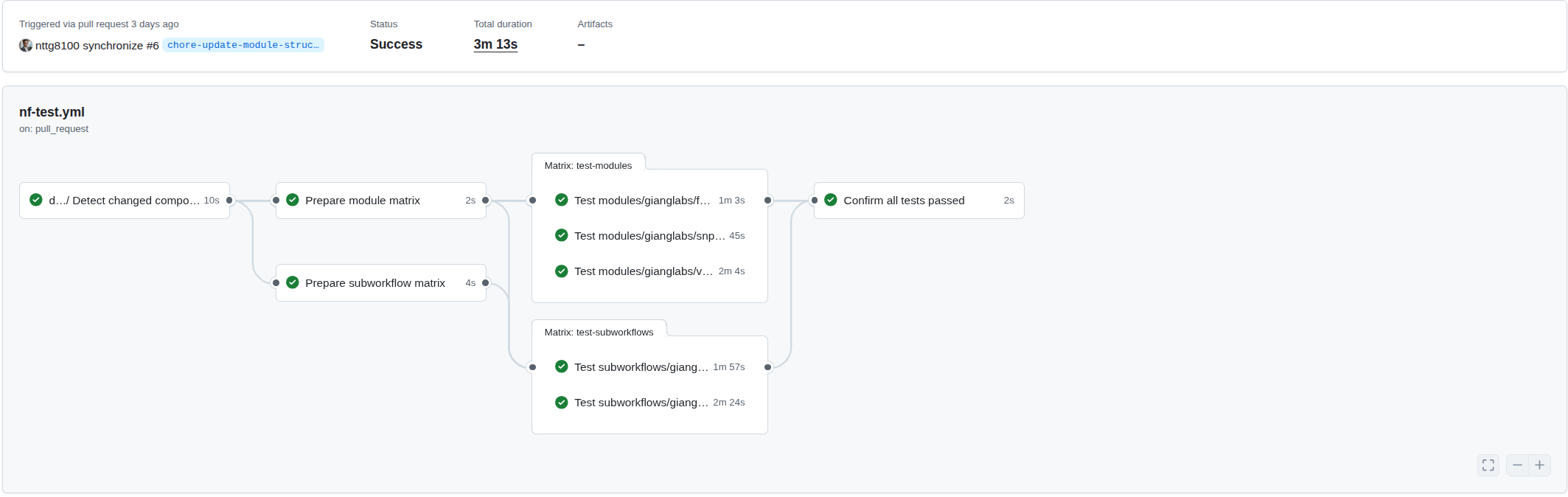
3.4. Áp dụng thực tế: tổ chức lại một pipeline hiện có
Cách tiếp cận này hữu ích khi di chuyển module từ một pipeline hiện có. Ví dụ, pipeline nf-germline-short-read-variant-calling đã được tổ chức lại để tách các module và subworkflow dùng lại được vào gianglabs/nf-modules. Các pipeline khác sau đó có thể cài trực tiếp những thành phần này:
# Install a specific module from gianglabs/nf-modulesnf-core modules --git-remote https://github.com/gianglabs/nf-modules.git install bcftools/index
# Install a reusable subworkflownf-core subworkflows --git-remote https://github.com/gianglabs/nf-modules.git install alignmentCấu trúc repository sau khi tổ chức lại:
# Reorganized modules directory (v1.0.0)modules/├── gianglabs/ # Optimized for production use│ ├── bcftools│ ├── bedtools│ ├── bwamem2│ ├── fastp│ ├── gatk│ ├── gatkspark│ ├── sambamba│ ├── samtools│ ├── snpeff│ └── vep└── local/ # Pipeline-specific modules ├── cnvnator ├── deepvariant ├── delly ├── freebayes ├── gatk ├── manta ├── smoove ├── survivor └── tiddit
# Reusable subworkflowssubworkflows/├── gianglabs/ # Domain-specific composition│ ├── alignment│ ├── alignment_preprocessing│ ├── variant_alignment_quality_control│ └── variant_annotation└── local/ # Pipeline-specific logic └── variant_callingSự tách biệt này cho phép tái sử dụng mã giữa các pipeline trong khi vẫn giữ các tùy biến đặc thù pipeline trong namespace local.
Tài liệu tham khảo
- nf-core/modules — repository module dùng chung chính thức
- gianglabs/nf-modules — ví dụ về module tùy biến
- nf-core/tools — công cụ CLI quản lý module
- Tài liệu nf-test — khung kiểm thử
- Tài liệu Pixi — quản lý môi trường tái lập được
- Tài liệu GATK — Genome Analysis Toolkit
- GitHub Actions Reusable Workflows — tổ hợp workflow
- Ảnh bìa: Programmer at work (Unsplash) — Crew crew, Wikimedia Commons, CC0
Bài viết liên quan
Xem tất cả bài viết →

28 tháng 09, 2026
Hướng dẫn xây dựng bộ genome vi khuẩn không cần lập trình


4 tháng 05, 2026
Pipeline phân tích methyl hóa từ dữ liệu đọc ngắn với Nextflow
3 tháng 05, 2026