From GitHub to Omicslab: a pipeline only needs the right schema
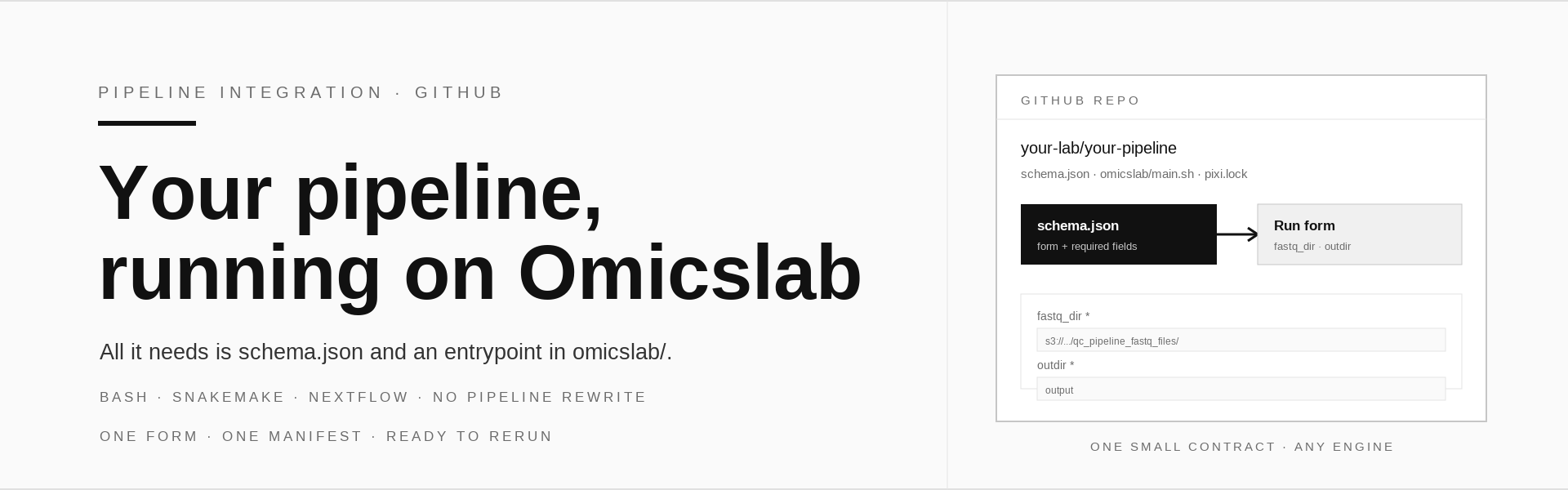
This post is for people who already have a working pipeline on GitHub and want to bring it onto the platform. You do not need to rewrite it in Nextflow, build a custom interface or change the platform for every tool. If you are new to the platform, How to Run nf-core Pipelines on the Omicslab Platform is the starting point; this post is about integrating your own pipeline.
One pipeline, many engines
An analysis pipeline often starts as a Bash script, a Snakefile, a Nextflow workflow or a chain of Python. When it moves onto a platform, the question is not "which engine is supported?" but "what does the platform need to run this pipeline?".
The answer is small: a schema describing the inputs, an entrypoint to run the pipeline, and an environment to run it in. When those three pieces match, the platform can build the form, run the job, keep the log and return the results — whether the inside is Bash, Snakemake or Nextflow.
The small contract of a pipeline
A repo that is ready to integrate usually looks like this:
my-pipeline/├── schema.json # form and required fields├── omicslab/│ └── main.sh # entrypoint; receives parameters as environment variables├── pixi.toml├── pixi.lock # pinned tool versions├── README.md└── tests/ # optional: test data and a local run scriptThe three main pieces:
schema.json— describes what the user must enter. The platform reads it and builds the form; required fields get a*, and a field withformat: directory-pathopens a folder picker.omicslab/main.sh— the entrypoint. The platform calls this script after preparing the repo, environment and parameters. The script can call Bash, Snakemake, Python, R or another workflow.pixi.toml+pixi.lock— the runtime environment. The entrypoint activates it withpixi shell-hook; the lock file keeps tool versions stable.
Folder name: omicslab/ is the current name. Older repos that use river/ still work: the platform creates a symlink from river to omicslab. For a new repo, use omicslab/main.sh.
Schema: the form starts here
The example below is the schema used by the two QC pipelines in this post. It has one input_output_options section with two required fields:
{ "$defs": { "input_output_options": { "title": "Input/Output Option", "type": "object", "required": ["fastq_dir", "outdir"], "properties": { "fastq_dir": { "type": "string", "default": "workspace", "format": "directory-path", "description": "Directory path" }, "outdir": { "type": "string", "default": "output", "format": "directory-path", "description": "Directory path" } } } }}How to read it:
requireddecides which fields must be filled before running. In the screenshot below,fastq_dirandoutdirboth have a*.typesays what kind of value it is;stringis text or a path.format: directory-pathturns the field into a folder picker instead of a free-text box.defaultpre-fills a value; the user can change it.descriptionis the help line under the field.
You can add more sections under $defs for other parameter groups — for example assembly_options or annotation_options. The platform shows each section as an item in the form.
Entrypoint: where the pipeline actually runs
The schema only describes the inputs. The execution lives in omicslab/main.sh. The platform passes the entered parameters to the script as environment variables; the script reads $fastq_dir, $outdir and calls the tools.
Example with Bash and FastQC/MultiQC:
#!/bin/bashset -euo pipefail
eval "$(pixi shell-hook --manifest-path analysis)"mkdir -p "$outdir"
fastqc "$fastq_dir"/*fq -o "$outdir"multiqc "$outdir" -o "$outdir" --forceExample with Snakemake:
#!/bin/bashset -euo pipefail
eval "$(pixi shell-hook --manifest-path analysis)"mkdir -p "$outdir"
snakemake --snakefile analysis/Snakefile --directory analysis \ --config fastq_dir="$fastq_dir" qc_dir="$outdir" --cores allThe two scripts differ in engine, but share the same schema and the same form. That is the point: the platform does not need to know whether the inside is Bash or Snakemake; it needs the entrypoint and the parameters.
The two example repos:
- Bash + FastQC/MultiQC — vieomics/bioinfor-wf-bashscipt-qc-ngs
- Snakemake + FastQC/MultiQC — vieomics/bioinfor-wf-snakemake-qc-ngs
Both are proof-of-concept examples, not production pipelines. They are small enough to read and real enough to test the integration contract. In the two repos today, the entrypoint still lives at river/main.sh (the old name); for a new repo, put the same content in omicslab/main.sh.
Add the pipeline to the platform
- Push the repo to GitHub with
schema.json,omicslab/main.sh,pixi.tomlandpixi.lock. - Open Analysis → Tools → Add, paste the repo's Git URL and choose a tag or commit.
- The platform reads the schema and builds the run form.
- Run it with test data, inspect the log and check the
outdir. - Save the manifest so the same parameters and version can be rerun later.
In the screenshot below, the two custom QC pipelines sit beside the nf-core pipelines in the same tool catalogue:
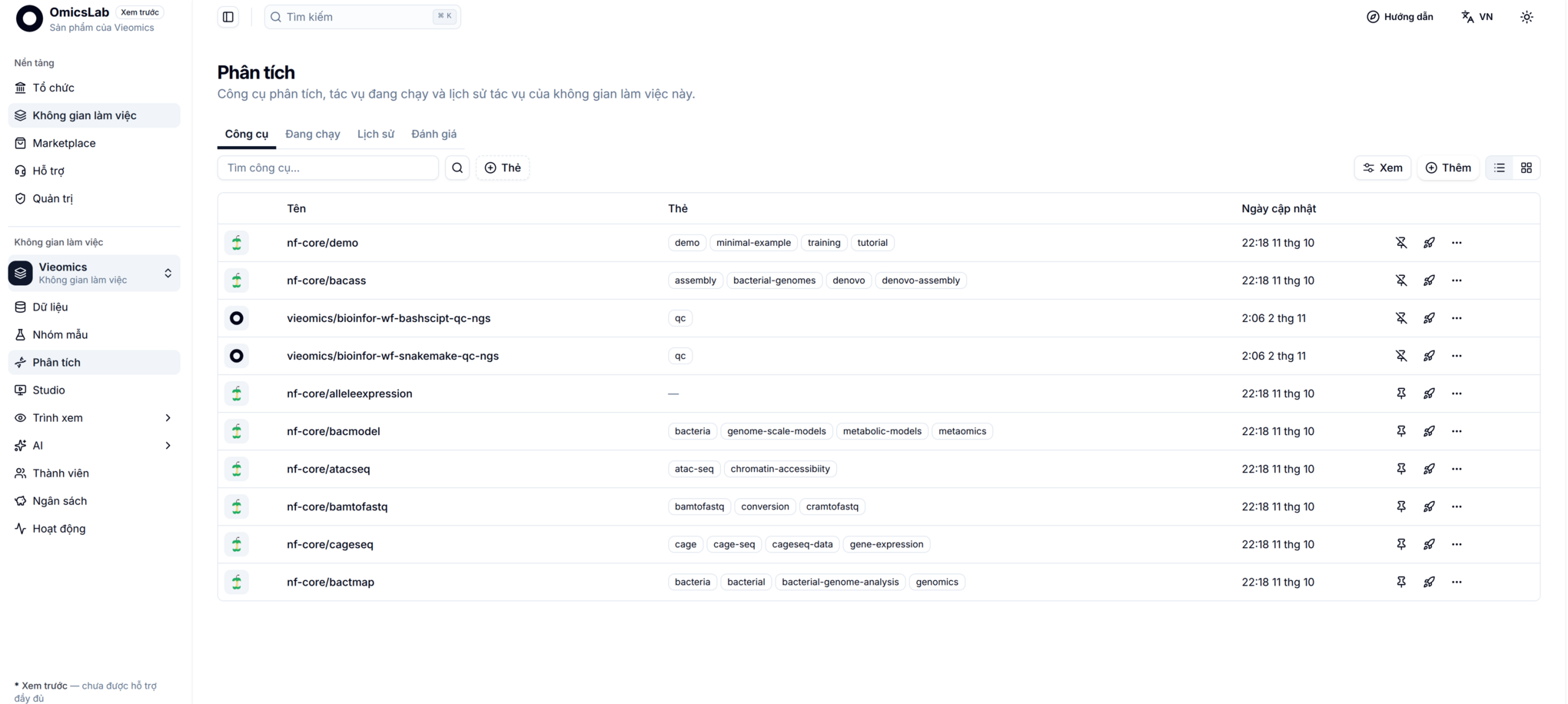
Figure 1 — vieomics/bioinfor-wf-bashscipt-qc-ngs and vieomics/bioinfor-wf-snakemake-qc-ngs sit in the same catalogue as the nf-core pipelines. The qc tag makes the two QC tools easy to filter in the catalogue.
When you open either tool, the form has only two fields — exactly what the schema describes:
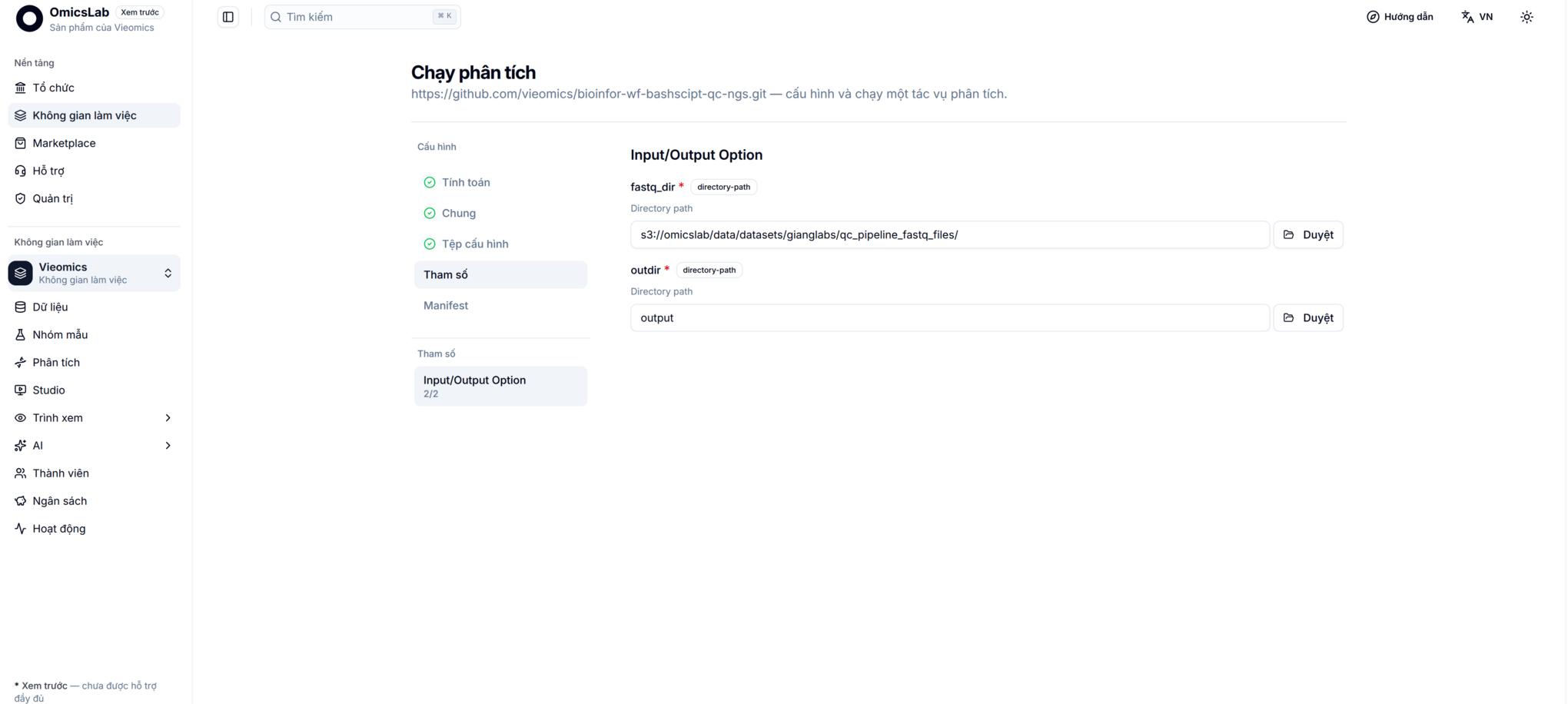
Figure 2 — The form is built from schema.json: fastq_dir and outdir, both required and both folder pickers. The same form works for Bash and Snakemake.
The repo keeps the pipeline; the platform keeps operations
| Component | Belongs to the repo | Handled by the platform |
|---|---|---|
| Algorithms and tools | Yes | Run inside the job environment |
schema.json |
Yes | Build the form and validate required fields |
omicslab/main.sh |
Yes | Call the entrypoint with parameters |
pixi.lock |
Yes | Reproduce the environment |
| Compute and storage | No | Allocated from the chosen configuration |
| Log, manifest, history | No | Stored and shown in the workspace |
outdir |
No | Collected, viewable and downloadable |
This split keeps the pipeline as your group's asset. The platform does not need to know every internal step; it needs an entrypoint and a schema.
Not only QC
The two examples are QC because they are easy to read and easy to run. The same contract can support:
- Variant-calling or annotation pipelines.
- RNA-seq, metagenomics or single-cell pipelines.
- A Python/R script that processes data and writes results to
outdir. - A custom Snakemake or Nextflow workflow.
The condition is that the pipeline runs as a command in the repo's environment and writes its results to outdir. If the pipeline needs a special environment, put that environment in omicslab/main.sh or in pixi.toml.
Test before integrating. Both repos include tests/run_local.sh to simulate the job locally. If the pipeline runs there, it is a good candidate for the platform.
Common questions
Does the pipeline have to be Nextflow?
No. Bash, Snakemake, Python, R or another CLI all work, as long as there is an entrypoint and a schema. nf-core/Nextflow has native handling, but it is not a requirement for integration.
Do I need to rewrite the pipeline?
No. Keep the workflow and add schema.json and omicslab/main.sh as the integration layer.
Can I use a private repo?
Yes, if your account has access to the repo. Configure Git credentials in Settings → Version control; see also Chapter 06.
What if the pipeline has many steps?
The entrypoint can call the whole workflow. The platform manages it as one job; the pipeline coordinates the steps internally.
Do I need containers?
Not necessarily. The examples use pixi to pin the environment; if the pipeline uses conda, a venv or a container, activate that environment in the entrypoint.
Get started
- Create an account at platform.omicslab.io — see the registration guide.
- Put the repo on GitHub with
schema.jsonandomicslab/main.sh. - Add the tool in Analysis → Tools, then test it with a small dataset.
- Need help with the integration? Write to contact@omicslab.io.
References
- Analysis schema — Analysis schema & manifest
- Bash example — vieomics/bioinfor-wf-bashscipt-qc-ngs
- Snakemake example — vieomics/bioinfor-wf-snakemake-qc-ngs
- Platform guide — How to Run nf-core Pipelines on the Omicslab Platform, Analysis jobs
- JSON Schema — json-schema.org