
Tối ưu chi phí tài nguyên tính toán cho bioinformatics với Nextflow (Phần 1)
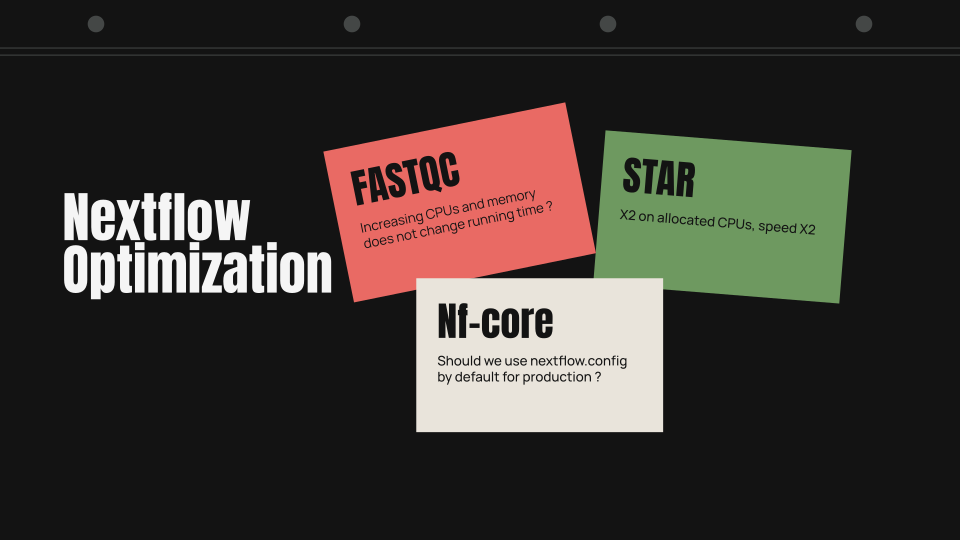
Nhiều công cụ bioinformatics có tuỳ chọn số luồng hoặc số CPU core. Tăng chúng có thể rút ngắn thời gian chạy, nhưng thường đi kèm mức tăng chi phí tài nguyên vừa phải. Việc tăng gấp đôi tài nguyên tính toán có làm thời gian chạy giảm một nửa hay không lại là câu hỏi khác: trên thực tế, mức tăng tốc thường thấp hơn tuyến tính, và mỗi công cụ hành xử khác nhau.
Trong bài này, chúng tôi benchmark một workflow nhỏ để xem việc tinh chỉnh CPU và bộ nhớ cho từng công cụ ảnh hưởng thế nào đến thời gian chạy và mức dùng tài nguyên. Mục tiêu là một quy trình thực tế để đưa workflow vào vận hành production mà không phải trả cho những tài nguyên công cụ không dùng đến.
Nextflow, một workflow manager được dùng rộng rãi, có sẵn các tính năng theo dõi và báo cáo việc dùng tài nguyên. Nhờ đó có thể đo CPU, bộ nhớ và thời gian thực cho từng bước, và đưa ra quyết định tối ưu dựa trên số đo thay vì giả định.
Bắt đầu với một workflow đơn giản
Các pipeline nf-core và Nextflow ngày càng phức tạp. Thay vì đi thẳng vào một pipeline như nf-core/rnaseq, chúng tôi dùng một workflow nhỏ để giới thiệu các khái niệm trước. Những bài học ở đây có thể áp dụng cho các pipeline lớn hơn.
Workflow minh hoạ kết hợp hai công cụ phổ biến có tuỳ chọn thread hoặc core.
- Công cụ: FastQC và fastp
- Cách benchmark: Chạy mỗi công cụ với mức CPU và bộ nhớ tăng dần (gấp 2 và gấp 3) để quan sát mức tiêu thụ tài nguyên và thời gian thực thi
- Repository: https://github.com/nttg8100/nextflow-cost-optimization
Cấu trúc workflow
├── LICENSE├── Makefile├── README.md├── benchmark.nf # Main workflow file├── inputs│ ├── 1_samplesheet.csv│ └── full_samplesheet.csv├── modules│ ├── fastp.nf│ └── fastqc.nf├── nextflow.config├── pixi.lock├── pixi.tomlTổng quan workflow
Workflow dưới đây chạy FastQC và fastp. Nó nhận một file CSV chứa metadata và đường dẫn file cho từng mẫu, sau đó chạy FastQC và fastp độc lập.
- Chiến lược đặt bí danh: Dùng bí danh với tiền tố
_\<number>(ví dụ FASTQC_1, FASTQC_2) để gán mức tài nguyên tăng dần cho benchmark
include { FASTQC as FASTQC_1 } from './modules/fastqc.nf'include { FASTQC as FASTQC_2 } from './modules/fastqc.nf'include { FASTQC as FASTQC_3 } from './modules/fastqc.nf'include { FASTP as FASTP_1 } from './modules/fastp.nf'include { FASTP as FASTP_2 } from './modules/fastp.nf'include { FASTP as FASTP_3 } from './modules/fastp.nf'
// Parse CSV; skip header, split by comma, expand to tuple for processChannel .fromPath(params.input) .splitCsv(header:true) .map { row -> // Compose the meta map and reads list def meta = [ id: row.sample, strandedness: row.strandedness ] def reads = [ row.fastq_1, row.fastq_2 ] tuple(meta, reads) } .set { sample_ch }
workflow { if (params.run_fastqc) { // fastqc benchmarks FASTQC_1(sample_ch) FASTQC_2(sample_ch) FASTQC_3(sample_ch) }
if (params.run_fastp) { // fastp benchmarks FASTP_1(sample_ch,[], false, false, false) FASTP_2(sample_ch,[], false, false, false) FASTP_3(sample_ch,[], false, false, false) }}Các module
FastQC
Module này dùng container để chạy FastQC với tài nguyên cấu hình được.
process FASTQC { tag "${meta.id}" label 'process_medium'
conda "${moduleDir}/environment.yml" container "${ workflow.containerEngine == 'singularity' && !task.ext.singularity_pull_docker_container ? 'https://depot.galaxyproject.org/singularity/fastqc:0.12.1--hdfd78af_0' : 'biocontainers/fastqc:0.12.1--hdfd78af_0' }"
input: tuple val(meta), path(reads)
output: tuple val(meta), path("*.html"), emit: html tuple val(meta), path("*.zip") , emit: zip path "versions.yml" , emit: versions
when: task.ext.when == null || task.ext.when
script: def args = task.ext.args ?: '' def prefix = task.ext.prefix ?: "${meta.id}" // Make list of old name and new name pairs to use for renaming in the bash while loop def old_new_pairs = reads instanceof Path || reads.size() == 1 ? [[ reads, "${prefix}.${reads.extension}" ]] : reads.withIndex().collect { entry, index -> [ entry, "${prefix}_${index + 1}.${entry.extension}" ] } def rename_to = old_new_pairs*.join(' ').join(' ') def renamed_files = old_new_pairs.collect{ _old_name, new_name -> new_name }.join(' ')
// The total amount of allocated RAM by FastQC equals the number of threads defined (--threads) times the amount of RAM defined (--memory) // https://github.com/s-andrews/FastQC/blob/1faeea0412093224d7f6a07f777fad60a5650795/fastqc#L211-L222 // Dividing task.memory by task.cpus allows us to stick to the requested amount of RAM in the label def memory_in_mb = task.memory ? task.memory.toUnit('MB') / task.cpus : null // FastQC memory value allowed range (100 - 10000) def fastqc_memory = memory_in_mb > 10000 ? 10000 : (memory_in_mb < 100 ? 100 : memory_in_mb)
""" printf "%s %s\\n" ${rename_to} | while read old_name new_name; do [ -f "\${new_name}" ] || ln -s \$old_name \$new_name done
fastqc \\ ${args} \\ --threads ${task.cpus} \\ --memory ${fastqc_memory} \\ ${renamed_files}
cat <<-END_VERSIONS > versions.yml "${task.process}": fastqc: \$( fastqc --version | sed '/FastQC v/!d; s/.*v//' ) END_VERSIONS """
stub: def prefix = task.ext.prefix ?: "${meta.id}" """ touch ${prefix}.html touch ${prefix}.zip
cat <<-END_VERSIONS > versions.yml "${task.process}": fastqc: \$( fastqc --version | sed '/FastQC v/!d; s/.*v//' ) END_VERSIONS """}Nhìn chung, script này dựng một lệnh với tuỳ chọn thread và bộ nhớ. Lưu ý ở đây bộ nhớ được cấp theo mỗi thread, chứ không phải theo tổng. Nếu task được cấp 8 thread và 16 GB RAM, nó chạy lệnh như sau:
#!/bin/bash -ueprintf "%s %s\n" SRX1603630_T1_1.fastq.gz GM12878_REP2_1.gz SRX1603630_T1_2.fastq.gz GM12878_REP2_2.gz | while read old_name new_name; do [ -f "${new_name}" ] || ln -s $old_name $new_namedone
fastqc \ \ --threads 8 \ --memory 2048 \ GM12878_REP2_1.gz GM12878_REP2_2.gz
cat <<-END_VERSIONS > versions.yml"FASTQC_3": fastqc: $( fastqc --version | sed '/FastQC v/!d; s/.*v//' )END_VERSIONSfastp
fastp đơn giản hơn về CPU và bộ nhớ. Nó cho phép chỉ định trực tiếp mà không cần tính lại bộ nhớ theo mỗi thread.
process FASTP { tag "$meta.id" label 'process_medium'
conda "${moduleDir}/environment.yml" container "${ workflow.containerEngine == 'singularity' && !task.ext.singularity_pull_docker_container ? 'https://community-cr-prod.seqera.io/docker/registry/v2/blobs/sha256/88/889a182b8066804f4799f3808a5813ad601381a8a0e3baa4ab8d73e739b97001/data' : 'community.wave.seqera.io/library/fastp:0.24.0--62c97b06e8447690' }"
input: tuple val(meta), path(reads) path adapter_fasta val discard_trimmed_pass val save_trimmed_fail val save_merged
output: tuple val(meta), path('*.fastp.fastq.gz') , optional:true, emit: reads tuple val(meta), path('*.json') , emit: json tuple val(meta), path('*.html') , emit: html tuple val(meta), path('*.log') , emit: log tuple val(meta), path('*.fail.fastq.gz') , optional:true, emit: reads_fail tuple val(meta), path('*.merged.fastq.gz'), optional:true, emit: reads_merged path "versions.yml" , emit: versions
when: task.ext.when == null || task.ext.when
script: def args = task.ext.args ?: '' def prefix = task.ext.prefix ?: "${meta.id}" def adapter_list = adapter_fasta ? "--adapter_fasta ${adapter_fasta}" : "" def fail_fastq = save_trimmed_fail && meta.single_end ? "--failed_out ${prefix}.fail.fastq.gz" : save_trimmed_fail && !meta.single_end ? "--failed_out ${prefix}.paired.fail.fastq.gz --unpaired1 ${prefix}_1.fail.fastq.gz --unpaired2 ${prefix}_2.fail.fastq.gz" : '' def out_fq1 = discard_trimmed_pass ?: ( meta.single_end ? "--out1 ${prefix}.fastp.fastq.gz" : "--out1 ${prefix}_1.fastp.fastq.gz" ) def out_fq2 = discard_trimmed_pass ?: "--out2 ${prefix}_2.fastp.fastq.gz" // Added soft-links to original fastqs for consistent naming in MultiQC // Use single ended for interleaved. Add --interleaved_in in config. if ( task.ext.args?.contains('--interleaved_in') ) { """ [ ! -f ${prefix}.fastq.gz ] && ln -sf $reads ${prefix}.fastq.gz
fastp \\ --stdout \\ --in1 ${prefix}.fastq.gz \\ --thread $task.cpus \\ --json ${prefix}.fastp.json \\ --html ${prefix}.fastp.html \\ $adapter_list \\ $fail_fastq \\ $args \\ 2>| >(tee ${prefix}.fastp.log >&2) \\ | gzip -c > ${prefix}.fastp.fastq.gz
cat <<-END_VERSIONS > versions.yml "${task.process}": fastp: \$(fastp --version 2>&1 | sed -e "s/fastp //g") END_VERSIONS """ } else if (meta.single_end) { """ [ ! -f ${prefix}.fastq.gz ] && ln -sf $reads ${prefix}.fastq.gz
fastp \\ --in1 ${prefix}.fastq.gz \\ $out_fq1 \\ --thread $task.cpus \\ --json ${prefix}.fastp.json \\ --html ${prefix}.fastp.html \\ $adapter_list \\ $fail_fastq \\ $args \\ 2>| >(tee ${prefix}.fastp.log >&2)
cat <<-END_VERSIONS > versions.yml "${task.process}": fastp: \$(fastp --version 2>&1 | sed -e "s/fastp //g") END_VERSIONS """ } else { def merge_fastq = save_merged ? "-m --merged_out ${prefix}.merged.fastq.gz" : '' """ [ ! -f ${prefix}_1.fastq.gz ] && ln -sf ${reads[0]} ${prefix}_1.fastq.gz [ ! -f ${prefix}_2.fastq.gz ] && ln -sf ${reads[1]} ${prefix}_2.fastq.gz fastp \\ --in1 ${prefix}_1.fastq.gz \\ --in2 ${prefix}_2.fastq.gz \\ $out_fq1 \\ $out_fq2 \\ --json ${prefix}.fastp.json \\ --html ${prefix}.fastp.html \\ $adapter_list \\ $fail_fastq \\ $merge_fastq \\ --thread $task.cpus \\ --detect_adapter_for_pe \\ $args \\ 2>| >(tee ${prefix}.fastp.log >&2)
cat <<-END_VERSIONS > versions.yml "${task.process}": fastp: \$(fastp --version 2>&1 | sed -e "s/fastp //g") END_VERSIONS """ }
stub: def prefix = task.ext.prefix ?: "${meta.id}" def is_single_output = task.ext.args?.contains('--interleaved_in') || meta.single_end def touch_reads = (discard_trimmed_pass) ? "" : (is_single_output) ? "echo '' | gzip > ${prefix}.fastp.fastq.gz" : "echo '' | gzip > ${prefix}_1.fastp.fastq.gz ; echo '' | gzip > ${prefix}_2.fastp.fastq.gz" def touch_merged = (!is_single_output && save_merged) ? "echo '' | gzip > ${prefix}.merged.fastq.gz" : "" def touch_fail_fastq = (!save_trimmed_fail) ? "" : meta.single_end ? "echo '' | gzip > ${prefix}.fail.fastq.gz" : "echo '' | gzip > ${prefix}.paired.fail.fastq.gz ; echo '' | gzip > ${prefix}_1.fail.fastq.gz ; echo '' | gzip > ${prefix}_2.fail.fastq.gz" """ $touch_reads $touch_fail_fastq $touch_merged touch "${prefix}.fastp.json" touch "${prefix}.fastp.html" touch "${prefix}.fastp.log"
cat <<-END_VERSIONS > versions.yml "${task.process}": fastp: \$(fastp --version 2>&1 | sed -e "s/fastp //g") END_VERSIONS """}Script này sinh lệnh chạy fastp với 2 read, trong đó bộ nhớ được cấp tự động.
#!/bin/bash -ue[ ! -f GM12878_REP2_1.fastq.gz ] && ln -sf SRX1603630_T1_1.fastq.gz GM12878_REP2_1.fastq.gz[ ! -f GM12878_REP2_2.fastq.gz ] && ln -sf SRX1603630_T1_2.fastq.gz GM12878_REP2_2.fastq.gzfastp \ --in1 GM12878_REP2_1.fastq.gz \ --in2 GM12878_REP2_2.fastq.gz \ --out1 GM12878_REP2_1.fastp.fastq.gz \ --out2 GM12878_REP2_2.fastp.fastq.gz \ --json GM12878_REP2.fastp.json \ --html GM12878_REP2.fastp.html \ \ \ \ --thread 2 \ --detect_adapter_for_pe \ \ 2>| >(tee GM12878_REP2.fastp.log >&2)
cat <<-END_VERSIONS > versions.yml"FASTP_1": fastp: $(fastp --version 2>&1 | sed -e "s/fastp //g")END_VERSIONSCấu hình
Cấu hình này cho phép workflow chạy với:
- Docker/Singularity để đóng gói container
- Khả năng theo dõi và báo cáo
- Các process được đặt tên để gán bộ nhớ và CPU
params{ outdir = "result" trace_report_suffix = new java.util.Date().format( 'yyyy-MM-dd_HH-mm-ss') input = "inputs/full_samplesheet.csv"}
profiles { singularity { singularity.enabled = true singularity.autoMounts = true conda.enabled = false docker.enabled = false podman.enabled = false shifter.enabled = false charliecloud.enabled = false apptainer.enabled = false } docker { docker.enabled = true conda.enabled = false singularity.enabled = false podman.enabled = false shifter.enabled = false charliecloud.enabled = false apptainer.enabled = false docker.runOptions = '-u $(id -u):$(id -g)' } emulate_amd64 { // Run AMD64 containers on ARM hardware using emulation (slower but more compatible) docker.runOptions = '-u $(id -u):$(id -g) --platform=linux/amd64' }
}
singularity.registry = 'quay.io'docker.registry = 'quay.io'
process{ withName:FASTQC_1{ cpus = 2 memory = 4.GB } withName:FASTQC_2{ cpus = 4 memory = 8.GB } withName:FASTQC_3{ cpus = 8 memory = 16.GB } withName:FASTP_1{ cpus = 2 memory = 4.GB } withName:FASTP_2{ cpus = 4 memory = 8.GB } withName:FASTP_3{ cpus = 8 memory = 16.GB }}
timeline { enabled = true file = "${params.outdir}/pipeline_info/execution_timeline_${params.trace_report_suffix}.html"}report { enabled = true file = "${params.outdir}/pipeline_info/execution_report_${params.trace_report_suffix}.html"}trace { enabled = true file = "${params.outdir}/pipeline_info/execution_trace_${params.trace_report_suffix}.txt"}Dữ liệu đầu vào
Sample sheet dưới đây gồm hai mẫu RNA-seq, mỗi mẫu có file đầu vào khoảng 6 đến 7 GB, đại diện cho kích thước dữ liệu thực tế.
sample,fastq_1,fastq_2,strandednessGM12878_REP1,s3://ngi-igenomes/test-data/rnaseq/SRX1603629_T1_1.fastq.gz,s3://ngi-igenomes/test-data/rnaseq/SRX1603629_T1_2.fastq.gz,reverseGM12878_REP2,s3://ngi-igenomes/test-data/rnaseq/SRX1603630_T1_1.fastq.gz,s3://ngi-igenomes/test-data/rnaseq/SRX1603630_T1_2.fastq.gz,reverseChạy benchmark
Các script nằm trong repository GitHub: https://github.com/nttg8100/nextflow-cost-optimization
Clone repository:
git clone https://github.com/nttg8100/nextflow-cost-optimization.gitcd nextflow-cost-optimization- Yêu cầu: Tối thiểu 8 CPU và 16 GB RAM (điều chỉnh theo tài nguyên tính toán của bạn trong
nextflow.config) - Phương án khác: Nếu bạn không có Docker, hãy chạy với Singularity
Chạy workflow, lệnh sẽ thực thi qua Nextflow (cài đặt bằng pixi). Máy của bạn cần có Docker.
# dockermake test-fastqc-docker-amd64make test-fastp-docker-amd64
# if you use MacBook with ARMmake test-fastqc-docker-arm64make test-fastp-docker-arm64
# if you do not have Docker installed, use Singularitymake test-fastqc-singularitymake test-fastp-singularity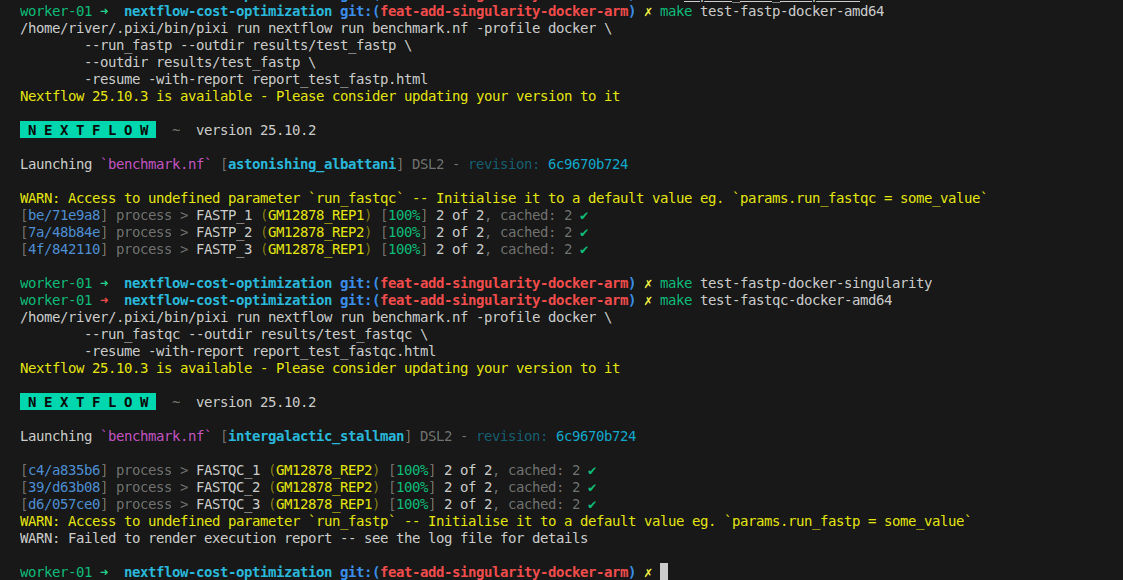
Cách đánh giá hiệu năng
Điều chúng ta muốn tối ưu là mức CPU và bộ nhớ tối thiểu mà vẫn chạy task hiệu quả, không quá chậm. Các báo cáo HTML do workflow sinh ra hỗ trợ việc phân tích này. Dưới đây là những chỉ số chúng tôi dùng để đánh giá:
-
%cpu: Phần trăm CPU trung bình mà process dùng trong quá trình chạy. Với các job đa luồng, giá trị này có thể vượt 100% (ví dụ 400% với một process dùng hết cả 4 CPU được cấp). -
rss: "Resident Set Size" — lượng bộ nhớ vật lý (RAM) tối đa mà process dùng, tính bằng byte. Chỉ số này cho biết process thực sự tiêu thụ bao nhiêu bộ nhớ ở đỉnh. -
realtime: Tổng thời gian (thời gian thực) mà process dùng, từ lúc bắt đầu đến khi kết thúc, bao gồm cả thời gian chờ và xử lý.
Các chỉ số này giúp tinh chỉnh và tối ưu pipeline bằng cách cho thấy mức dùng tài nguyên thực tế của từng bước.
FastQC
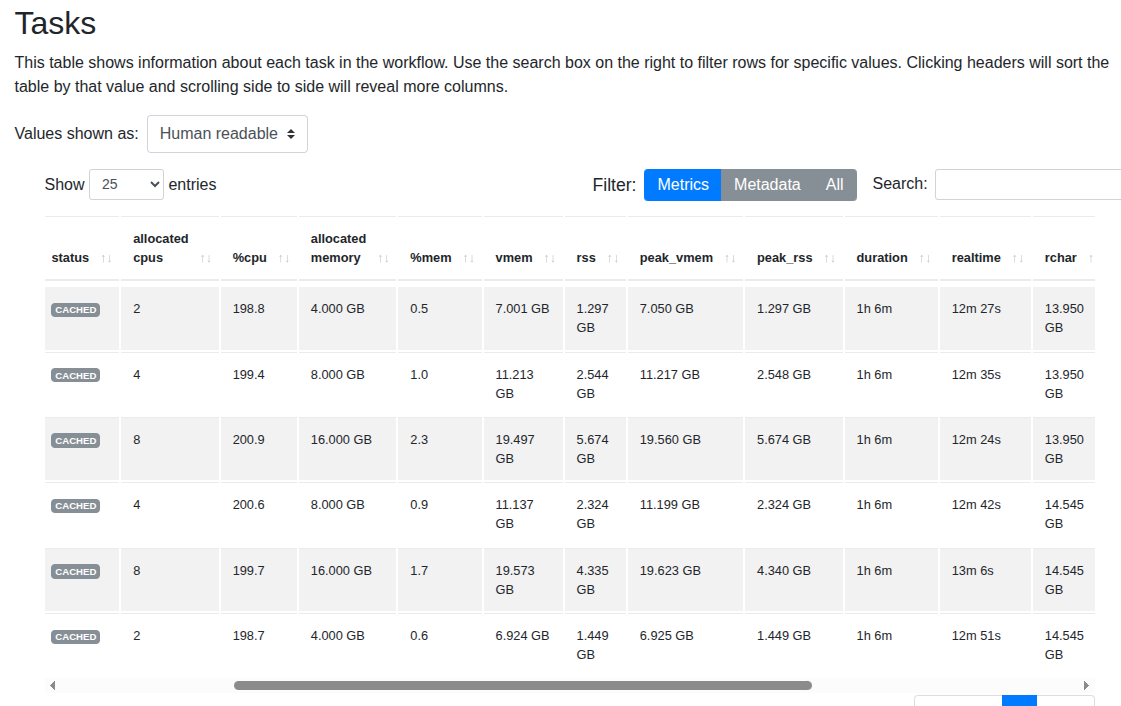
Trong lần chạy này, thời gian thực thi hầu như không thay đổi khi tăng bộ nhớ và CPU. Từ thí nghiệm này, một lựa chọn là dùng cấu hình tối thiểu — 2 CPU và 4 GB RAM — vốn cho hiệu năng gần như tương đương.
- Lưu ý: Module được lấy trực tiếp từ nf-core. Có thể còn một lỗi liên quan đến FastQC chưa được xác định.
- Phát hiện: Với các bộ dữ liệu này, có thể dùng tài nguyên tối thiểu (rẻ hơn nhiều) mà không ảnh hưởng đáng kể đến thời gian chạy.
fastp
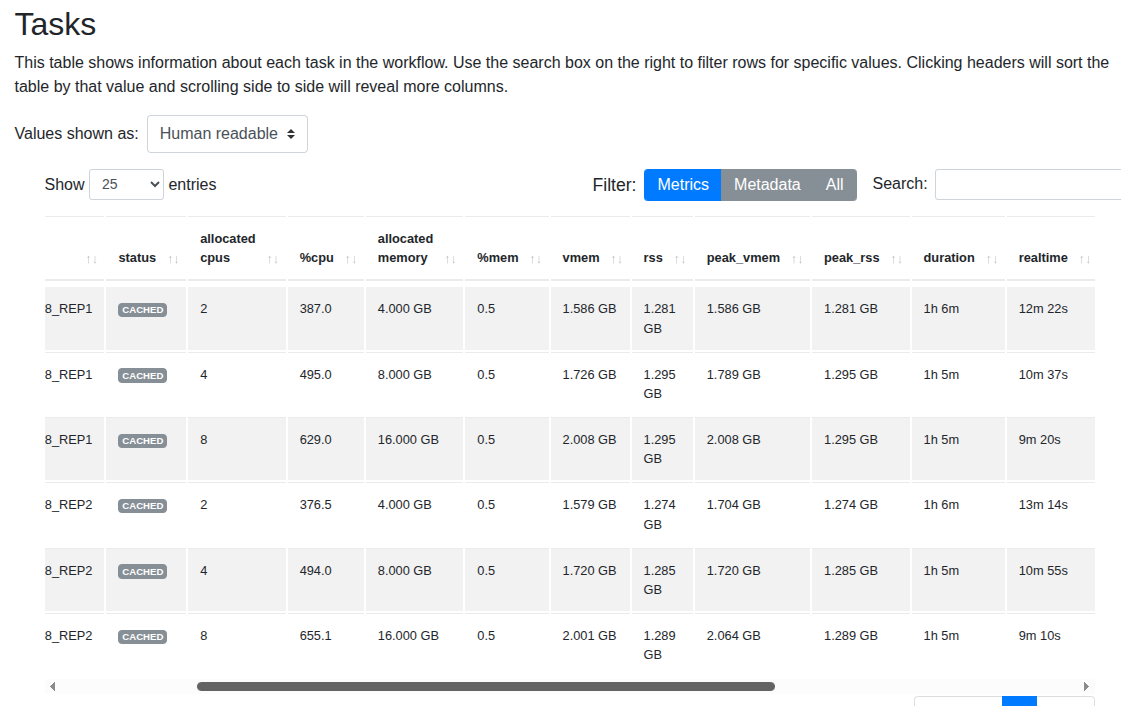
Với fastp, việc tăng bộ nhớ và CPU cho thấy thời gian chạy giảm nhẹ.
Các benchmark bên ngoài
Ví dụ trên có thể điều chỉnh cho các công cụ khác. Các benchmark bên ngoài dưới đây báo cáo rằng việc điều chỉnh tài nguyên tính toán đã giảm thời gian chạy trong khi chi phí gần như không đổi.
TrimGalore
Changelog báo cáo rằng dùng 4 CPU giảm thời gian gần 4 lần so với chỉ dùng 1 CPU.
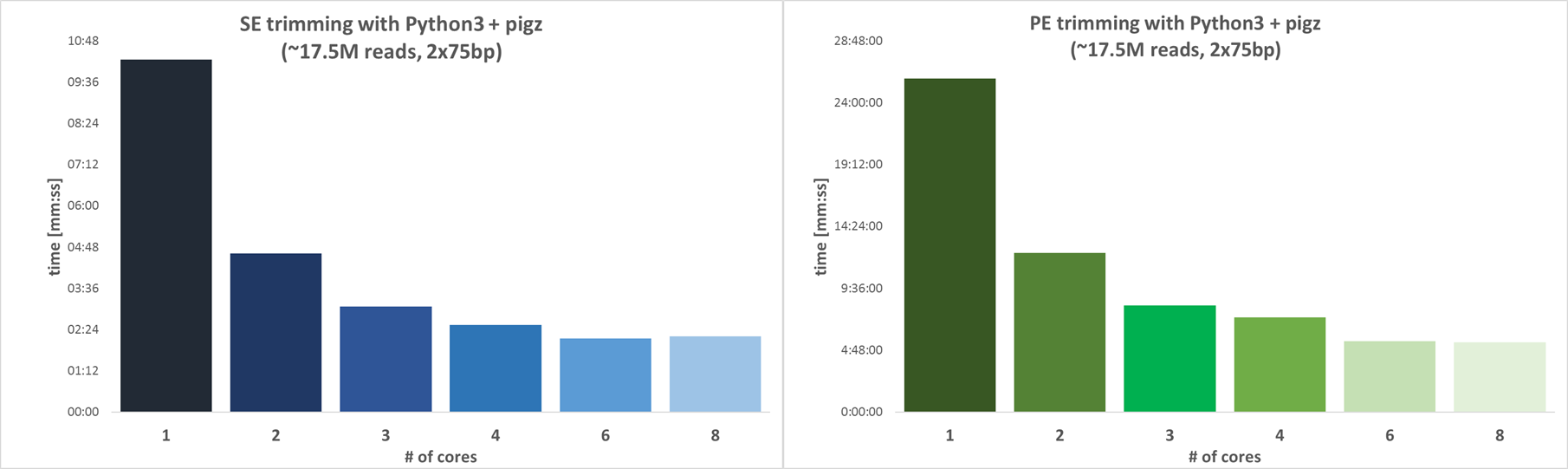
STAR
Tham khảo: https://academic.oup.com/bioinformatics/article/29/1/15/272537
Bài báo STAR báo cáo rằng dùng 12 thread cho căn chỉnh gần gấp đôi số read so với 6 thread, trong khi mức dùng bộ nhớ không đổi.
Áp dụng cho nf-core
- Nếu bạn chạy workflow trên HPC, hãy cân nhắc tỉ lệ giữa CPU và bộ nhớ. Nếu một job dùng hết bộ nhớ, sẽ không còn CPU cho job khác.
nf-core là một trong những cộng đồng workflow bioinformatics lớn và năng động nhất. Các pipeline của họ thường dùng nhãn tài nguyên chung để định nghĩa yêu cầu CPU và bộ nhớ cho từng process. Ví dụ, pipeline nf-core/rnaseq gán tài nguyên mặc định theo các nhãn như medium cho những công cụ như FASTQC và FASTP.
Nếu không tinh chỉnh các thiết lập này theo từng công cụ cụ thể, workflow có thể lãng phí tài nguyên và tăng chi phí. Trong các lần chạy trên, cả FASTQC và FASTP thường chỉ cần 2 CPU và 4 GB RAM — ít hơn mức medium mặc định.
Điều này đặc biệt quan trọng khi chạy batch job trên cloud (AWS, Google Cloud, Azure, v.v.), nơi máy ảo thường được cấu hình với tỉ lệ CPU:Bộ nhớ là 1:2. Yêu cầu tài nguyên với tỉ lệ cao hơn, như 1:6, có thể làm tăng thời gian chờ trong hàng đợi và dẫn đến dùng tài nguyên kém hiệu quả, vì bạn có thể phải chờ instance khả dụng lâu hơn mà vẫn không dùng hết phần bộ nhớ dư.
withLabel:process_single { cpus = { 1 } memory = { 6.GB * task.attempt } time = { 4.h * task.attempt }}withLabel:process_low { cpus = { 2 * task.attempt } memory = { 12.GB * task.attempt } time = { 4.h * task.attempt }}withLabel:process_medium { cpus = { 6 * task.attempt } memory = { 36.GB * task.attempt } time = { 8.h * task.attempt }}withLabel:process_high { cpus = { 12 * task.attempt } memory = { 72.GB * task.attempt } time = { 16.h * task.attempt }}withLabel:process_long { time = { 20.h * task.attempt }}withLabel:process_high_memory { memory = { 200.GB * task.attempt }}Để ghi đè cpus và memory của process trong workflow hiện có, dùng withName cho các task cụ thể hoặc điều chỉnh tài nguyên theo nhãn:
process{ cpus = { 1 * task.attempt } memory = { 2.GB * task.attempt } time = { 4.h * task.attempt }
errorStrategy = { task.exitStatus in ((130..145) + 104 + 175) ? 'retry' : 'finish' } maxRetries = 1 maxErrors = '-1'
withLabel:process_single { cpus = { 1 } memory = { 2.GB * task.attempt } time = { 4.h * task.attempt } } withLabel:process_low { cpus = { 2 * task.attempt } memory = { 4.GB * task.attempt } time = { 4.h * task.attempt } } withLabel:process_medium { cpus = { 8 * task.attempt } memory = { 16.GB * task.attempt } time = { 8.h * task.attempt } } withLabel:process_high { cpus = { 16 * task.attempt } memory = { 32.GB * task.attempt } time = { 16.h * task.attempt } } withLabel:process_long { time = { 20.h * task.attempt } } withLabel:process_high_memory { memory = { 32.GB * task.attempt } } withLabel:error_ignore { errorStrategy = 'ignore' } withLabel:error_retry { errorStrategy = 'retry' maxRetries = 2 } withLabel: process_gpu { ext.use_gpu = { workflow.profile.contains('gpu') } accelerator = { workflow.profile.contains('gpu') ? 1 : null } } withName: FASTQC{ cpus = { 2 * task.attempt } memory = { 4.GB * task.attempt } time = { 4.h * task.attempt } } withName: '.*:ALIGN_STAR:STAR_ALIGN|.*:ALIGN_STAR:STAR_ALIGN_IGENOMES'{ container = "docker.io/nttg8100/star:2.7.11b" }}Bài học rút ra
Hai module trên giúp việc chọn CPU và bộ nhớ dễ hơn. Để tối ưu theo chi phí, một vài quan sát từ các lần chạy này:
- Với các task ngắn hơn 20 phút, việc tăng CPU và bộ nhớ không giảm đáng kể thời gian chạy — tài nguyên tối thiểu là đủ.
- Một số công cụ hưởng lợi rõ rệt từ nhiều CPU và bộ nhớ hơn. Với những công cụ này, việc tăng tài nguyên tính toán là hợp lý.
- Dùng khoảng 80% tài nguyên khả dụng thường là đủ. Khi đầu vào lớn hơn một chút, các công cụ vẫn hoàn thành mà không bị crash.
Tài liệu tham khảo
- Tài liệu Nextflow: nextflow.io/docs
- Các pipeline nf-core: nf-core.com
- Cấu hình tài nguyên mặc định của nf-core/rnaseq: github.com/nf-core/rnaseq/blob/master/conf/base.config
- FastQC: bioinformatics.babraham.ac.uk/projects/fastqc
- fastp: Chen S. và cộng sự, Bioinformatics (2018): academic.oup.com/bioinformatics/article/34/17/i884/5093234
- STAR: Dobin A. và cộng sự, Bioinformatics (2013): academic.oup.com/bioinformatics/article/29/1/15/272537
- Changelog TrimGalore: github.com/FelixKrueger/TrimGalore/blob/master/CHANGELOG.md
- Repository benchmark: github.com/nttg8100/nextflow-cost-optimization
Bài viết liên quan
Xem tất cả bài viết →19 tháng 01, 2026
Tối ưu chi phí tài nguyên cho input với Nextflow (Phần 2)

4 tháng 05, 2026
Pipeline phân tích methyl hóa từ dữ liệu đọc ngắn với Nextflow
3 tháng 05, 2026
Pipeline gọi biến thể somatic từ dữ liệu đọc ngắn với Nextflow
2 tháng 05, 2026
Pipeline gọi biến thể germline từ dữ liệu đọc ngắn với Nextflow