Variant Calling (Part 1): Building a Reproducible GATK Variant Calling Workflow in Bash with Pixi

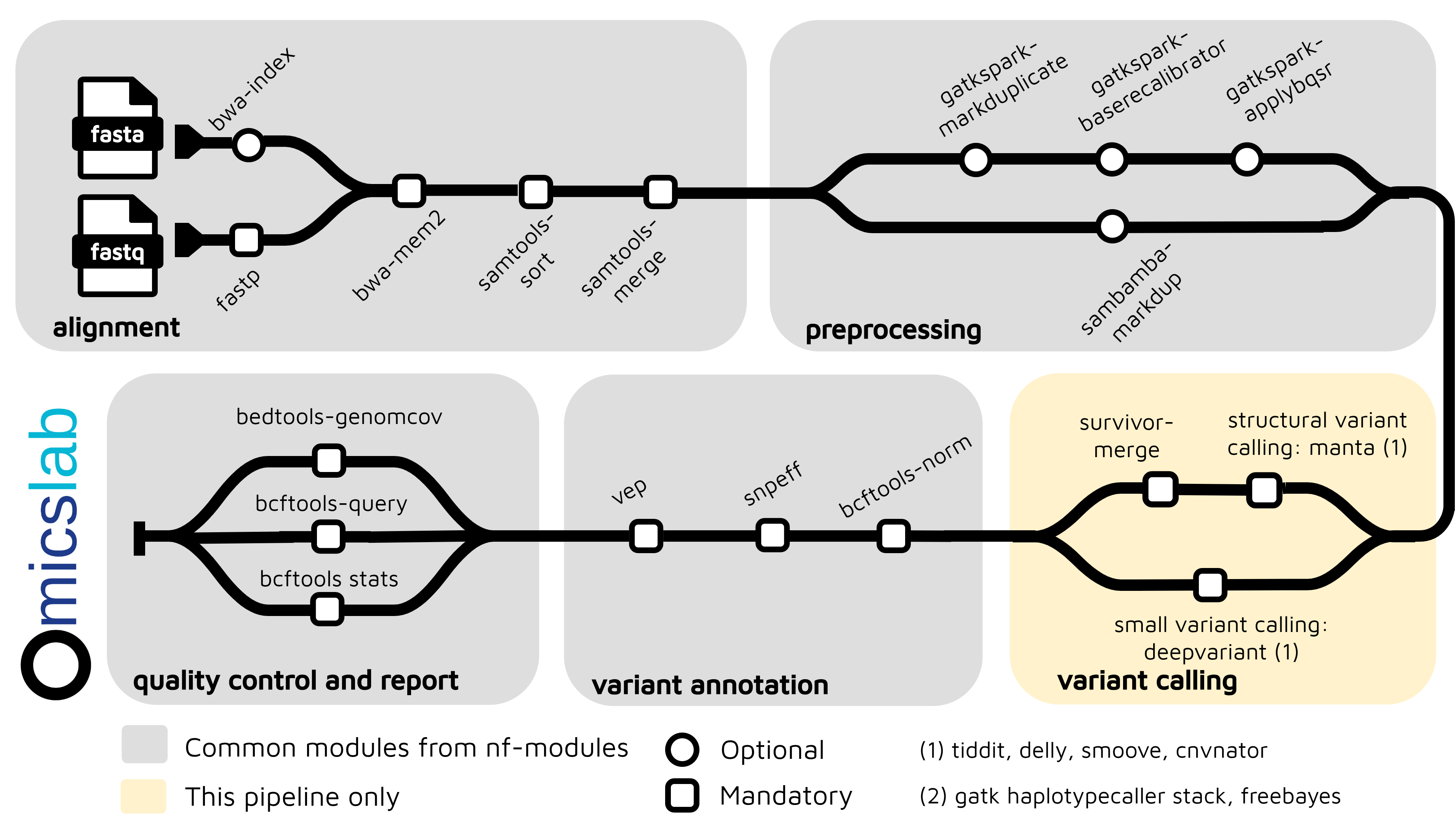
This post is a practical starting point for a germline variant calling workflow. It begins with a straightforward approach: bash scripts, plus a reproducible environment managed by Pixi. Later posts in the series look at moving the same workflow to Nextflow, where optimization, customization and additional tooling can be considered.
The code for this tutorial is available in the GitHub repository: https://github.com/nttg8100/nf-germline-short-read-variant-calling/tree/0.1.0
Series overview
This is a five-part series that takes a germline variant calling workflow from a bash script to a production deployment:
- Part 1 (this post) — a bash workflow with a reproducible Pixi environment.
- Part 2 — from Bash to Nextflow: migrating the same steps and checking that the results agree.
- Part 3 — production-scale deployment: SLURM configuration and per-tool resource tuning.
- Part 4 — testing and linting: lint rules and
nf-testsnapshots. - Part 5 — benchmarking: scoring the pipeline against the GIAB HG002 truth set.
Prerequisites and related reading
Before starting, it helps to be familiar with:
- Pixi — a new conda-based era — the package management setup used here.
- Containers on HPC: from Docker to Singularity and Apptainer — container fundamentals for reproducibility.
- Version control — Git's role in reproducible bioinformatics (Part 1) — version control basics.
1. The GATK variant calling workflow
1.1 Understanding the workflow
The NGS101 GATK tutorial offers a clear introduction to germline variant calling. This section follows the ten steps described there so the structure of the pipeline is easy to follow.
Germline variant calling is a core part of DNA sequencing analysis on whole-genome data. DNA consists of 23 pairs of chromosomes and more than three billion base pairs. Individuals share the same overall structure, but the exact nucleotide sequence (A, T, C, G) differs between them; these differences are called variants.
The Human Genome Project established a reference genome, which is used as a template for comparing individual genomes. Variants are the differences between an individual's DNA and that reference. Most variants are benign and simply contribute to individual variation.
The figure below illustrates how paired-end reads (red and blue) are aligned to the reference genome. When a read differs from the reference at a position (highlighted in green), a variant may be present. If several reads support the same difference, the evidence for a real variant increases.
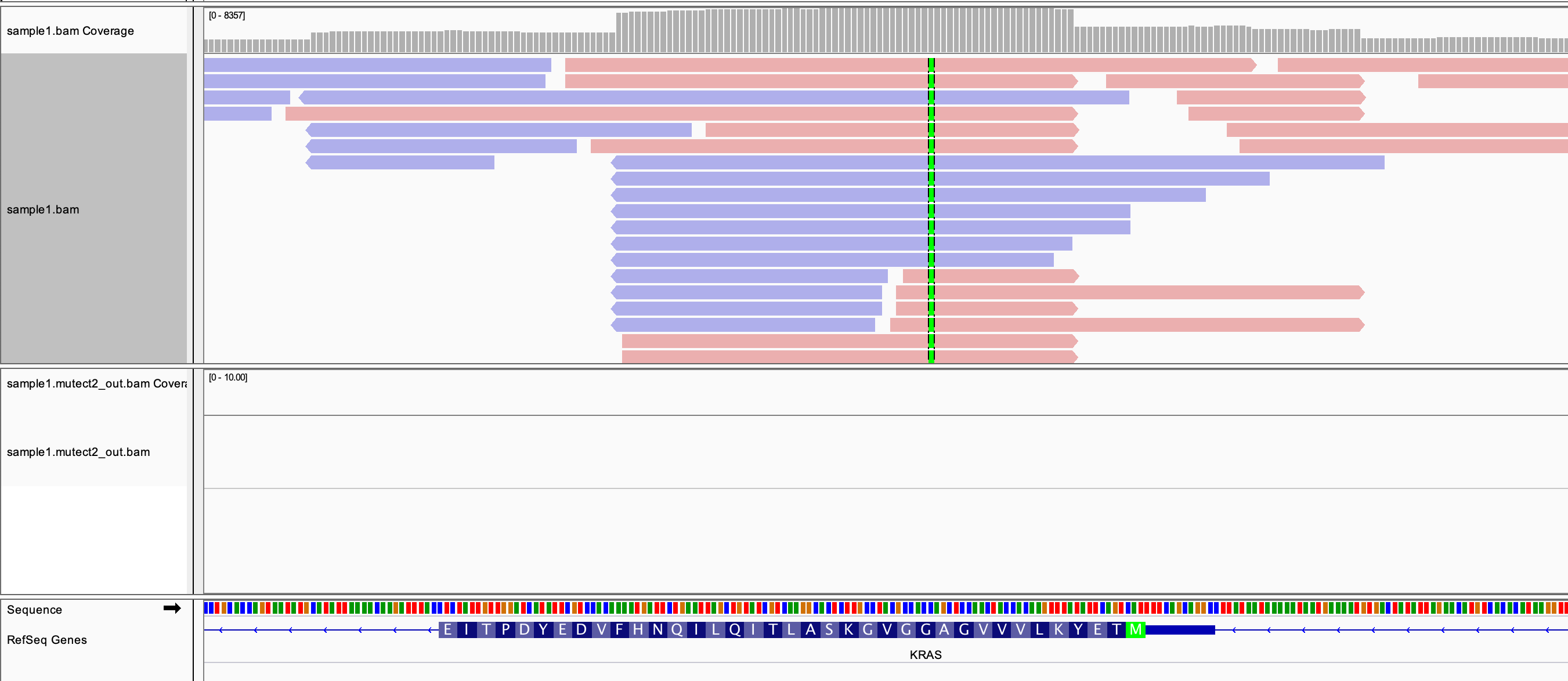
To identify variants with reasonable confidence, short sequencing reads must be aligned accurately to the reference. Germline variants are inherited and typically appear in roughly 40–50% of reads when heterozygous (inherited from one parent) or close to 100% when homozygous (inherited from both). Somatic mutations arise in cells that were not inherited, for example in cancer, and usually require comparing tumour and normal samples to separate true somatic variants from inherited ones.
Following these foundational steps provides a workable germline variant calling workflow and a basis for understanding the biology behind each stage.
1.2 Data
Many public datasets can be used to develop a variant calling workflow. For this tutorial we use the small test dataset provided by nf-core/sarek, which is intended for rapid pipeline prototyping.
Working with a manageable, representative subset is helpful during development. Datasets such as sarek's are typically built by extracting raw reads that align to a specific genomic region. One approach is to align the original FASTQ files to the reference genome with a short bash script, then keep only the reads mapped to a region such as chr22:100,000-200,000. In the same spirit, the reference genome can be subset to chr22:1-250,000. This reduces the input size considerably and speeds up testing and iteration. Once the workflow is validated on the small dataset, it can be run against the full dataset.
1.3 Step-by-step explanation
1.3.1 Quality control of raw reads (FastQC)
- Assess read quality metrics.
- Identify potential sequencing issues.
- Generate HTML reports.
# download raw small datawget https://raw.githubusercontent.com/nf-core/test-datasets/modules/data/genomics/homo_sapiens/illumina/fastq/test_1.fastq.gz# view filezcat test_1.fastq.gz|headUnderstanding the FASTQ file structure
@normal#21#998579#1/1CCTTCTCCCTGCTGGGGTTGCTTGTCAGTAGCGGGCAAGGTAGGAGTGTGGCGCTTTATTGCATTTACTTTCCCTCCCCCTTCCCCCCGGCCAAGAGAGG+102302000331;3333;23133320233330*33/233333333333333/313232333/3;3;3/333000;11/00;;01//103*1032323233@normal#21#998572#2/1CTCCTCTCCTTCTACCTGCTGGGGTTGCTTGTCAGTAGCGGGCAAGGTCGGAGTGTTGCGCTTTATTGCATTTACTTTCCCTCCCCCTTCCACCCGGCCA+/201302/0330;30033133333;230;333033333033300333203333333;*03133;223300;2;3/33211/210001;2/13/0133//3@normal#21#998620#3/1AGGAGTGGGCGCTTTATTGCATTTACTTTCCGTCCCCCTTCCACCCGGCCAAGAGAGGCAAAGAGGGAGGCCAGGAAGAATGAAATGAAAGAACTAAAA FASTQ file is the standard format for storing raw sequencing reads from NGS platforms. Each read is represented by four lines:
- Sequence identifier (starts with
@): information about the read, for example instrument, run and coordinates. - Nucleotide sequence: the actual DNA bases (A, T, C, G or N).
- Separator line (starts with
+): may repeat the identifier or be a simple plus sign. - Quality scores: ASCII-encoded Phred quality scores for each base in the sequence.
Example:
@normal#21#998579#1/1CCTTCTCCCTGCTGGGGTTGCTTGTCAGTAGCGGGCAAGGTAGGAGTGTGGCGCTTTATTGCATTTACTTTCCCTCCCCCTTCCCCCCGGCCAAGAGAGG+102302000331;3333;23133320233330*33/233333333333333/313232333/3;3;3/333000;11/00;;01//103*1032323233- The first line is the read name.
- The second line is the sequence.
- The third line is a separator.
- The fourth line encodes the quality of each base (the same length as the sequence).
This structure repeats for every read in the file. Trimming is usually applied to reads of low quality; otherwise they may align poorly to the reference and reduce the reliability of variant calling.
1.3.2 Trim reads (Trim Galore)
- The aim is simply to trim low-quality reads.
- With Trim Galore, FastQC is re-run on the trimmed data so the result can be checked — to confirm that reads were trimmed as expected and that not too much data was removed.
1.3.3 Align to the reference genome
Download the reference genome and inspect its structure:
# Download reference genomewget https://raw.githubusercontent.com/nf-core/test-datasets/modules/data/genomics/homo_sapiens/genome/genome.fastahead genome.fastaThe first ten lines below simply show the reference as an ordered sequence of A, T, C and G. Comparing a read against the reference by eye is not practical, so we use bwa, which performs the comparison much faster. Ben Langmead's lecture series explains the algorithm behind this in more detail: https://www.youtube.com/watch?v=6BJbEWyO_N0&list=PL2mpR0RYFQsADmYpW2YWBrXJZ_6EL_3nu&index=4
>chr22ACTCAAGATAATGATGAGTAAAGAATATATTTCTAACAACAAAAAGGAAATTTGATAGTATTTCTAAAGACAAAAAGGAAATTTGTATTCACATTCAGTTAGTCATTCCACCAGAATGACTTCATCACACAATATTTTGTGACAAGAACCTGAACAGCCTCATGTTTTACAATATTCTTTTCATCTTTTATTATATGCACCAAAATTTTCTTTTTTAAATTTTCTTGAACCTCTAAATCTACTTTAAAAATTTACCTGATACACTTTTTAAATGGACAAATGCTGAAGGTAGCTGTGTATACAAATGTGACTAGAAGGAAAAAGATGATGTAGAAATACAATAACTCCTTGAGTTGATCATTCTGATTGGCATTTATAGAGTAGAAATGTTTTGTAATTACAGAGGAAAAAAGATGGCCTTTCCTTCAACAGTTATGAGCCGTCAGAATTTTCAAAAATATTGCATTTTGACAATGTAGTTTCTAGTTTGACAATGATATATTTATCTTCAAAACCAGGAAAATGTAGATAAGGATTTGGThe reference should be indexed once and reused, rather than re-indexed on every run while the reference is unchanged:
# simple command, however, to install bwa, later we use pixibwa index genome.fasta1.3.4 Sort and index aligned reads (Samtools)
After alignment, reads are sorted by genomic coordinate with Samtools. Sorting is needed for downstream analysis, in particular for variant calling and visualization, because many tools expect sorted BAM files. Indexing creates a .bai file that acts as a table of contents, allowing fast access to specific regions of the BAM file.
1.3.5 Mark duplicates (GATK MarkDuplicates)
GATK MarkDuplicates identifies PCR or optical duplicate reads — reads with identical sequences and alignment positions. Because DNA is fragmented into short reads, true duplicates are rare; most duplicates come from technical artefacts. Marking or removing them prevents them from inflating support for a variant. For example, if 14% of reads support a variant but 10% are duplicates, only 4% represent genuine evidence.
1.3.6 Base quality score recalibration (GATK BaseRecalibrator)
This step models and corrects systematic errors in the base quality scores reported by the sequencer. Using known variant sites, GATK BaseRecalibrator produces a recalibration table that is used to adjust quality scores, which improves the accuracy of downstream variant calls.
# Download one db, we still have indel databasewget https://raw.githubusercontent.com/nf-core/test-datasets/modules/data/genomics/homo_sapiens/genome/vcf/dbsnp_146.hg38.vcf.gz# Check first few line, it shows the variant at specific positionzcat dbsnp_146.hg38.vcf.gz|grep -v "#"|head|column -tchr22 66 rs568512106 A G . PASS RS=568512106;RSPOS=16570065;dbSNPBuildID=142;SSR=0;SAO=0;VP=0x050000000005040024000100;WGT=1;VC=SNV;ASP;VLD;KGPhase3;CAF=0.9994,0.000599;COMMON=0chr22 67 rs371364157 A G . PASS RS=371364157;RSPOS=16570066;dbSNPBuildID=138;SSR=0;SAO=0;VP=0x050000000005000002000100;WGT=1;VC=SNV;ASPchr22 68 rs536054182 A C . PASS RS=536054182;RSPOS=16570067;dbSNPBuildID=142;SSR=0;SAO=0;VP=0x050000000005040024000100;WGT=1;VC=SNV;ASP;VLD;KGPhase3;CAF=0.9994,0.000599;COMMON=0chr22 91 rs149338188 ACATT A . PASS RS=149338188;RSPOS=16570091;dbSNPBuildID=134;SSR=0;SAO=0;VP=0x05000000000515003e000200;WGT=1;VC=DIV;ASP;VLD;G5;KGPhase1;KGPhase3;CAF=0.8083,0.1917;COMMON=1chr22 91 rs75245162 ACATT A . PASS RS=75245162;RSPOS=16570093;dbSNPBuildID=131;SSR=0;SAO=0;VP=0x050000000005000002000200;WGT=1;VC=DIV;ASP;CAF=0.8083,0.1917;COMMON=1chr22 96 rs150045226 C T . PASS RS=150045226;RSPOS=16570095;dbSNPBuildID=134;SSR=0;SAO=0;VP=0x050000000005000002000100;WGT=1;VC=SNV;ASPchr22 103 rs563344083 TC T . PASS RS=563344083;RSPOS=16570103;dbSNPBuildID=142;SSR=0;SAO=0;VP=0x050000000005040026000200;WGT=1;VC=DIV;ASP;VLD;KGPhase3;CAF=0.997,0.002995;COMMON=1chr22 140 rs370473918 T C . PASS RS=370473918;RSPOS=16570139;dbSNPBuildID=138;SSR=0;SAO=0;VP=0x050000000005000002000100;WGT=1;VC=SNV;ASPchr22 177 rs553984036 C A . PASS RS=553984036;RSPOS=16570176;dbSNPBuildID=142;SSR=0;SAO=0;VP=0x050000000005040024000100;WGT=1;VC=SNV;ASP;VLD;KGPhase3;CAF=0.9996,0.0003994;COMMON=0chr22 208 rs565829750 T C . PASS RS=565829750;RSPOS=16570207;dbSNPBuildID=142;SSR=0;SAO=0;VP=0x050000000005000024000100;WGT=1;VC=SNV;ASP;KGPhase3;CAF=0.9998,0.0001997;COMMON=01.3.7 Apply BQSR (GATK ApplyBQSR)
The recalibration table is applied to the BAM file, updating the base quality scores. This produces an analysis-ready BAM file with more reliable quality metrics, which is central to confident variant detection.
1.3.8 Quality assessment
Collect the alignment summary metrics.
1.3.9 Variant calling (GATK HaplotypeCaller)
GATK HaplotypeCaller analyses the recalibrated BAM file to identify SNPs and indels. It performs local assembly of haplotypes and writes variants in VCF or GVCF format, providing the basis for further genotyping and filtering.
1.3.10 Genotype (GATK GenotypeGVCFs)
Genotyping is the process of determining which alleles are present at specific positions in a sample's DNA. GATK GenotypeGVCFs combines variant calls from multiple samples (in GVCF format) into a final set of genotypes, which allows variants to be identified consistently across a cohort.
2. Installing the tools
2.1 Why Pixi
Pixi has several practical properties for bioinformatics workflows:
- Fast: environment resolution is usually much faster than with conda.
- Reproducible: lock files pin the exact environment.
- Simple: a single
pixi.tomlfile describes everything. - Cross-platform: works on Linux, macOS and Windows.
For a more detailed discussion of Pixi, see Pixi — a new conda-based era.
2.2 Creating the project
Create a new directory and initialise the Pixi project:
mkdir bash-gatkcd bash-gatk
# install Pixi if not already installedcurl -fsSL https://pixi.sh/install.sh | bashpixi init# activate env that is similar to condapixi shellCreate a pixi.toml file, either from the command line or in a code editor:
[workspace]name = "bash-gatk"version = "0.1.0"description = "GATK variant calling workflow - from bash to Nextflow transformation"channels = ["conda-forge", "bioconda"]platforms = ["linux-64"]
[dependencies]To install a tool, run the command below. Pinning a version is advisable; Pixi writes the resolved version into the lock file, so the exact version can be read back from the configuration later.
# add bwa tools, better with hard version, pixi add lock file while adding hard version that we can quickly check version on the config filepixi add bwa==0.7.17# show where you tool is installedwhich bwaTools can be added one at a time. The full set used by the standard workflow described here is:
[workspace]name = "bash-gatk"version = "0.1.0"description = "GATK variant calling workflow - from bash to Nextflow transformation"channels = ["conda-forge", "bioconda"]platforms = ["linux-64"]
[dependencies]bwa = "==0.7.17"samtools = "==1.16.1"gatk4 = "==4.6.2.0"fastqc = "==0.12.1"curl = "*"trim-galore = "==0.6.11"r-base = "==4.4.0"3. Preparing inputs and references
The input data is downloaded once and reused. It does not need to be downloaded on every run.
#!/bin/bash## Download test data for GATK variant calling pipeline# This script downloads reference genome, known sites, and test FASTQ files from nf-core#
set -euo pipefail
echo "=========================================="echo "Downloading GATK Pipeline Test Data"echo "=========================================="echo
# Create directoriesecho "Creating directories..."mkdir -p data referenceecho "✓ Directories created"echo
# Download reference genomeecho "Downloading reference genome..."cd reference
curl -L -o genome.fasta \ https://raw.githubusercontent.com/nf-core/test-datasets/modules/data/genomics/homo_sapiens/genome/genome.fastaecho "✓ genome.fasta downloaded"
curl -L -o genome.fasta.fai \ https://raw.githubusercontent.com/nf-core/test-datasets/modules/data/genomics/homo_sapiens/genome/genome.fasta.faiecho "✓ genome.fasta.fai downloaded"
curl -L -o genome.dict \ https://raw.githubusercontent.com/nf-core/test-datasets/modules/data/genomics/homo_sapiens/genome/genome.dictecho "✓ genome.dict downloaded"
# Download known sites for BQSRecho ""echo "Downloading known sites VCF files..."
curl -L -o dbsnp_146.hg38.vcf.gz \ https://raw.githubusercontent.com/nf-core/test-datasets/modules/data/genomics/homo_sapiens/genome/vcf/dbsnp_146.hg38.vcf.gzecho "✓ dbsnp_146.hg38.vcf.gz downloaded"
curl -L -o dbsnp_146.hg38.vcf.gz.tbi \ https://raw.githubusercontent.com/nf-core/test-datasets/modules/data/genomics/homo_sapiens/genome/vcf/dbsnp_146.hg38.vcf.gz.tbiecho "✓ dbsnp_146.hg38.vcf.gz.tbi downloaded"
curl -L -o mills_and_1000G.indels.vcf.gz \ https://raw.githubusercontent.com/nf-core/test-datasets/modules/data/genomics/homo_sapiens/genome/vcf/mills_and_1000G.indels.vcf.gzecho "✓ mills_and_1000G.indels.vcf.gz downloaded"
curl -L -o mills_and_1000G.indels.vcf.gz.tbi \ https://raw.githubusercontent.com/nf-core/test-datasets/modules/data/genomics/homo_sapiens/genome/vcf/mills_and_1000G.indels.vcf.gz.tbiecho "✓ mills_and_1000G.indels.vcf.gz.tbi downloaded"
cd ..
# Index the reference genomeecho ""echo "Creating BWA index for reference genome..."echo "This may take a few moments..."bwa index reference/genome.fastaecho "✓ BWA index created"
# Download test FASTQ filesecho ""echo "Downloading test FASTQ files..."cd data
curl -L -o sample1_R1.fastq.gz \ https://raw.githubusercontent.com/nf-core/test-datasets/modules/data/genomics/homo_sapiens/illumina/fastq/test_1.fastq.gzecho "✓ test_1.fastq.gz downloaded"
curl -L -o sample1_R2.fastq.gz \ https://raw.githubusercontent.com/nf-core/test-datasets/modules/data/genomics/homo_sapiens/illumina/fastq/test_2.fastq.gzecho "✓ test_2.fastq.gz downloaded"
cd ..
# Summaryecho ""echo "=========================================="echo "Data Download Completed Successfully!"echo "=========================================="echo ""echo "Downloaded files:"echo "Reference genome:"ls -lh reference/genome.fasta* reference/genome.dict 2>/dev/null || trueecho ""echo "BWA indices:"ls -lh reference/genome.fasta.{amb,ann,bwt,pac,sa} 2>/dev/null || trueecho ""echo "Known sites VCFs:"ls -lh reference/*.vcf.gz* 2>/dev/null || trueecho ""echo "Test FASTQ files:"ls -lh data/*.fastq.gz 2>/dev/null || trueecho ""echo "=========================================="echo "You can now run the pipeline with: Nextflow workflow"echo " cd nextflow-gatk; pixi run nextflow run main.nf -profile singularity --input samplesheet.csv"echo "You can now run the pipeline with: Bash workflow"echo " cd nextflow-gatk; pixi run bash gatk_pipeline.sh"echo "=========================================="4. Running the workflow end to end
4.1 Running the pipeline
The workflow has the following structure:
├── bash-gatk│ ├── gatk_pipeline.sh│ ├── pixi.lock│ └── pixi.toml├── README.md└── scripts ├── download_data.shDownload the data first, then run the variant calling pipeline:
# Activate env on this folderpixi shell --manifest-path bash-gatk# Run the download script (uses Pixi environment for BWA indexing)bash scripts/download_data.shCheck that the data and reference folders are populated as expected:
├── bash-gatk│ ├── gatk_pipeline.sh│ ├── pixi.lock│ └── pixi.toml├── data│ ├── sample1_R1.fastq.gz│ └── sample1_R2.fastq.gz├── README.md├── reference│ ├── dbsnp_146.hg38.vcf.gz│ ├── dbsnp_146.hg38.vcf.gz.tbi│ ├── genome.dict│ ├── genome.fasta│ ├── genome.fasta.amb│ ├── genome.fasta.ann│ ├── genome.fasta.bwt│ ├── genome.fasta.fai│ ├── genome.fasta.pac│ ├── genome.fasta.sa│ ├── mills_and_1000G.indels.vcf.gz│ └── mills_and_1000G.indels.vcf.gz.tbi└── scripts ├── download_data.shThe bash workflow itself is bash-gatk/gatk_pipeline.sh:
#!/bin/bash## GATK Variant Calling Pipeline - Complete Best Practices (10 Steps)# Based on NGS101 tutorial: https://ngs101.com/how-to-analyze-whole-genome-sequencing-data-for-absolute-beginners-part-1-from-raw-reads-to-high-quality-variants-using-gatk/# Adapted to use nf-core test data with hard filtering (Option 2)## This pipeline implements the complete GATK workflow with:# - Adapter trimming and quality filtering (Trim Galore)# - Read alignment with BWA-MEM# - Duplicate marking (GATK MarkDuplicates)# - Base quality score recalibration (BQSR)# - Alignment quality metrics (GATK CollectMetrics)# - Variant calling with HaplotypeCaller (GVCF mode)
set -euo pipefail
# ConfigurationSAMPLE="${1:-sample1}" # Accept sample name as first argument, default to sample1THREADS=2DATA_DIR="data"REF_DIR="reference"RESULTS_DIR="results"
# Reference filesREFERENCE="${REF_DIR}/genome.fasta"DBSNP="${REF_DIR}/dbsnp_146.hg38.vcf.gz"KNOWN_INDELS="${REF_DIR}/mills_and_1000G.indels.vcf.gz"
# Input FASTQ filesFASTQ_R1="${DATA_DIR}/${SAMPLE}_R1.fastq.gz"FASTQ_R2="${DATA_DIR}/${SAMPLE}_R2.fastq.gz"
# Output directoriesQC_DIR="${RESULTS_DIR}/qc/${SAMPLE}"TRIMMED_DIR="${RESULTS_DIR}/trimmed/${SAMPLE}"ALIGNED_DIR="${RESULTS_DIR}/aligned/${SAMPLE}"VAR_DIR="${RESULTS_DIR}/var/${SAMPLE}"
# Output filesTRIMMED_R1="${TRIMMED_DIR}/${SAMPLE}_R1_val_1.fq.gz"TRIMMED_R2="${TRIMMED_DIR}/${SAMPLE}_R2_val_2.fq.gz"ALIGNED_BAM="${ALIGNED_DIR}/${SAMPLE}.bam"SORTED_BAM="${ALIGNED_DIR}/${SAMPLE}.sorted.bam"DEDUP_BAM="${ALIGNED_DIR}/${SAMPLE}_marked_duplicates.bam"RECAL_TABLE="${ALIGNED_DIR}/${SAMPLE}_recal_data.table"RECAL_BAM="${ALIGNED_DIR}/${SAMPLE}_recalibrated.bam"GVCF="${VAR_DIR}/${SAMPLE}.g.vcf.gz"RAW_VCF="${VAR_DIR}/${SAMPLE}_raw_variants.vcf.gz"METRICS="${ALIGNED_DIR}/${SAMPLE}_duplicate_metrics.txt"
# Check tools are availableecho "Checking required tools..."echo "✓ FastQC:"fastqc --versionecho "✓ Trim Galore:"trim_galore --versionecho "✓ BWA:"bwa || true # BWA doesn't have a --version flag, so we ignore the errorecho "✓ Samtools:"samtools --versionecho "✓ GATK:"gatk --versionecho "✓ R (for insert size histogram):"R --versionecho "All required tools are available."
# Create output directoriesmkdir -p ${QC_DIR} ${TRIMMED_DIR} ${ALIGNED_DIR} ${VAR_DIR}
echo "=========================================="echo "GATK Variant Calling Pipeline - Complete"echo "Sample: ${SAMPLE}"echo "Based on NGS101 Best Practices"echo "=========================================="echo
# Step 1: Quality Control with FastQCecho "[$(date)] Step 1: Running FastQC on raw reads..."fastqc -o ${QC_DIR} -t ${THREADS} ${FASTQ_R1} ${FASTQ_R2}echo "[$(date)] FastQC completed"echo
# Step 2: Adapter Trimming and Quality Filteringecho "[$(date)] Step 2: Adapter trimming with Trim Galore..."trim_galore \ --paired \ --quality 20 \ --length 50 \ --fastqc \ --output_dir ${TRIMMED_DIR} \ ${FASTQ_R1} ${FASTQ_R2}echo "[$(date)] Adapter trimming completed"echo
# Step 3: Read Alignment with BWA-MEMecho "[$(date)] Step 3: Aligning reads with BWA-MEM..."bwa mem \ -t ${THREADS} \ -M \ -R "@RG\tID:${SAMPLE}\tSM:${SAMPLE}\tPL:ILLUMINA\tLB:${SAMPLE}_lib" \ ${REFERENCE} \ ${TRIMMED_R1} ${TRIMMED_R2} \ | samtools view -Sb - > ${ALIGNED_BAM}echo "[$(date)] Alignment completed"echo
# Step 4: Sort and Index BAM fileecho "[$(date)] Step 4: Sorting BAM file..."samtools sort -@ ${THREADS} -o ${SORTED_BAM} ${ALIGNED_BAM}samtools index ${SORTED_BAM}echo "[$(date)] Sorting completed"echo
# Step 5: Mark Duplicatesecho "[$(date)] Step 5: Marking duplicates with GATK..."gatk MarkDuplicates \ -I ${SORTED_BAM} \ -O ${DEDUP_BAM} \ -M ${METRICS}echo "[$(date)] Mark duplicates completed"echo
# Step 6: Base Quality Score Recalibration (BQSR) - Generate tableecho "[$(date)] Step 6: Generating BQSR recalibration table..."gatk BaseRecalibrator \ -I ${DEDUP_BAM} \ -R ${REFERENCE} \ --known-sites ${DBSNP} \ --known-sites ${KNOWN_INDELS} \ -O ${RECAL_TABLE}echo "[$(date)] BQSR table generated"echo
# Step 7: Apply BQSRecho "[$(date)] Step 7: Applying BQSR..."gatk ApplyBQSR \ -I ${DEDUP_BAM} \ -R ${REFERENCE} \ --bqsr-recal-file ${RECAL_TABLE} \ -O ${RECAL_BAM}echo "[$(date)] BQSR applied"echo
# Step 8: Alignment Quality Assessmentecho "[$(date)] Step 8: Collecting alignment quality metrics..."gatk CollectAlignmentSummaryMetrics \ -R ${REFERENCE} \ -I ${RECAL_BAM} \ -O ${QC_DIR}/${SAMPLE}_alignment_summary.txt
# Collect insert size metrics with histogram (requires R)gatk CollectInsertSizeMetrics \ -I ${RECAL_BAM} \ -O ${QC_DIR}/${SAMPLE}_insert_size_metrics.txt \ -H ${QC_DIR}/${SAMPLE}_insert_size_histogram.pdfecho "[$(date)] Alignment QC completed"echo
# Step 9: Variant Calling with HaplotypeCaller (GVCF mode)echo "[$(date)] Step 9: Calling variants with HaplotypeCaller in GVCF mode..."gatk HaplotypeCaller \ -R ${REFERENCE} \ -I ${RECAL_BAM} \ -O ${GVCF} \ -ERC GVCF \ --dbsnp ${DBSNP}echo "[$(date)] GVCF generation completed"echo
# Step 10: Genotype GVCFsecho "[$(date)] Step 10: Genotyping GVCF to VCF..."gatk GenotypeGVCFs \ -R ${REFERENCE} \ -V ${GVCF} \ -O ${RAW_VCF}echo "[$(date)] Genotyping completed"echobash bash-gatk/gatk_pipeline.shThe resulting output directory looks like this:
── results│ ├── aligned│ │ └── sample1│ │ ├── sample1.bam│ │ ├── sample1_duplicate_metrics.txt│ │ ├── sample1_marked_duplicates.bai│ │ ├── sample1_marked_duplicates.bam│ │ ├── sample1_recal_data.table│ │ ├── sample1_recalibrated.bai│ │ ├── sample1_recalibrated.bam│ │ └── sample1.sorted.bam│ ├── qc│ │ └── sample1│ │ ├── sample1_alignment_summary.txt│ │ ├── sample1_insert_size_histogram.pdf│ │ ├── sample1_insert_size_metrics.txt│ │ ├── sample1_R1_fastqc.html│ │ ├── sample1_R1_fastqc.zip│ │ ├── sample1_R2_fastqc.html│ │ └── sample1_R2_fastqc.zip│ ├── trimmed│ │ └── sample1│ │ ├── sample1_R1.fastq.gz_trimming_report.txt│ │ ├── sample1_R1_val_1_fastqc.html│ │ ├── sample1_R1_val_1_fastqc.zip│ │ ├── sample1_R1_val_1.fq.gz│ │ ├── sample1_R2.fastq.gz_trimming_report.txt│ │ ├── sample1_R2_val_2_fastqc.html│ │ ├── sample1_R2_val_2_fastqc.zip│ │ └── sample1_R2_val_2.fq.gz│ └── var│ └── sample1│ ├── sample1.g.vcf.gz│ ├── sample1.g.vcf.gz.tbi│ ├── sample1_raw_variants.vcf.gz│ └── sample1_raw_variants.vcf.gz.tbi4.2 Validating the output
Open the FastQC HTML reports in a browser to review the quality control results.
To inspect the variant calling output, run:
zcat results/var/sample1/sample1_raw_variants.vcf.gz5. Recap
Bash workflows with Pixi provide reproducible environments, but they have limitations:
- Sequential execution, with no parallel sample processing.
- Manual management of analysis state.
- Limited scalability for local, cloud or HPC deployment.
Modern workflow management frameworks such as WDL, Snakemake, Galaxy and Nextflow address these limitations. In the next post we convert this bash workflow into a Nextflow pipeline for improved automation and scalability.
References
- NGS101 GATK tutorial — a walkthrough of a GATK variant calling workflow: https://ngs101.com/how-to-analyze-whole-genome-sequencing-data-for-absolute-beginners-part-1-from-raw-reads-to-high-quality-variants-using-gatk/
- GATK best practices — Broad Institute workflow documentation: https://gatk.broadinstitute.org/hc/en-us/sections/360007226651-Best-Practices-Workflows
- nf-core test datasets — public test data used above: https://github.com/nf-core/test-datasets
- Pixi — documentation: https://pixi.sh
- BWA — manual: http://bio-bwa.sourceforge.net/bwa.shtml
- SAMtools / HTSlib — documentation: http://www.htslib.org/
- GATK — tool documentation: https://gatk.broadinstitute.org/hc/en-us
- Trim Galore — Babraham Bioinformatics: https://www.bioinformatics.babraham.ac.uk/projects/trim_galore/
- SnpEff — variant annotation: http://pcingola.github.io/SnpEff/
- bcftools — variant manipulation: http://samtools.github.io/bcftools/
- GATK hard filtering versus VQSR — when to use each: https://gatk.broadinstitute.org/hc/en-us/articles/360035531112--How-to-Filter-variants-either-with-VQSR-or-by-hard-filtering
- Joint genotyping and GVCF mode — the logic of joint calling for germline short variants: https://gatk.broadinstitute.org/hc/en-us/articles/360035890431-The-logic-of-joint-calling-for-germline-short-variants
- Reference code for this post: https://github.com/nttg8100/nf-germline-short-read-variant-calling/tree/0.1.0
Related articles
Browse all articles →